






SMTP (Simple Mail Transfer Protocol) is the standard protocol for sending email over the Internet, playing a critical role in email transmission. This article explains how SMTP works, the role of SMTP servers and provides a detailed configuration guide.
High-Speed Proxy - Ready to Try?
ALGO Proxy offers residential, datacenter & 4G proxies in 195+ countries
What is SMTP?
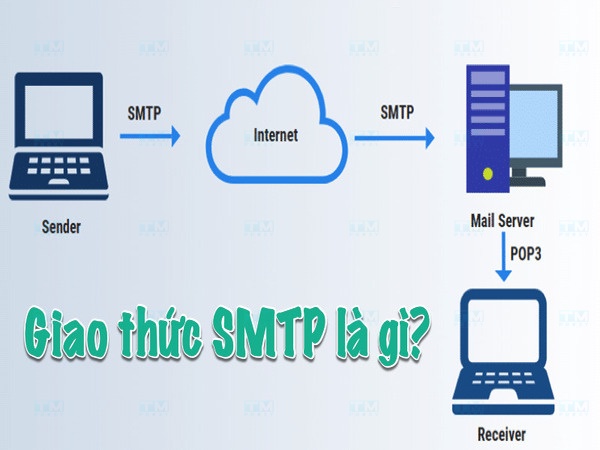
SMTP (Simple Mail Transfer Protocol) is the protocol for transmitting email over the Internet. SMTP is responsible for sending email from the client to the server and between servers. It's an application layer protocol in the OSI model, ensuring emails are sent correctly to the right address.
SMTP uses a client-server model where the client initiates the connection and requests to send email, while the server handles processing and delivering mail to the destination.
What is an SMTP Server?
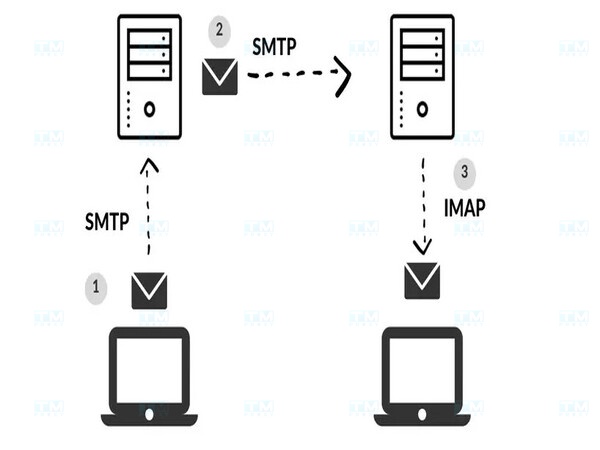
An SMTP server handles sending and receiving email via the SMTP protocol. It acts as an intermediary, relaying email from sender to recipient through the Internet.
When a user sends email, the SMTP server checks the recipient address validity, authenticates the sender, then sends the email to the destination server or another relay server. The SMTP server also sends error reports if the sending process encounters issues.
How SMTP Works
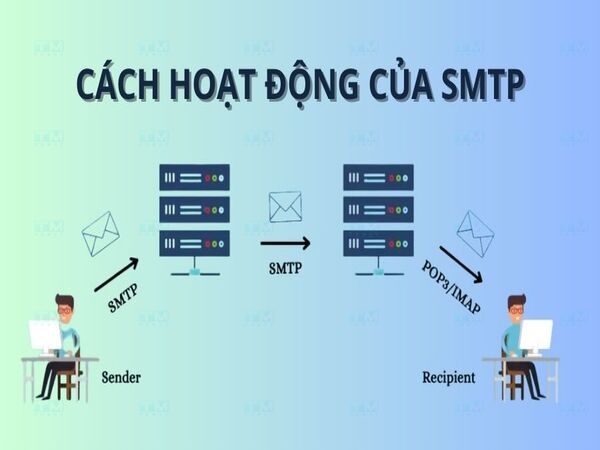
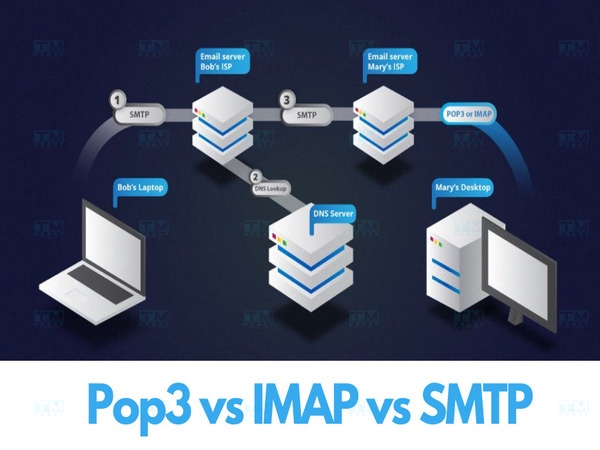
SMTP operates on a request-response mechanism between sender and server:
- Connection initiation: Email software (Outlook, Gmail) connects to the SMTP server to begin sending.
- Sender authentication: The SMTP server requires authentication via username and password.
- Recipient identification: The server receives recipient information including email address and domain.
- Domain lookup: SMTP uses DNS to look up the recipient domain and find the receiving mail server.
- Email transmission: The email is sent over the Internet to the recipient's mail server.
- Message delivery: SMTP sends the email message with attachments using port 25 or 587.
- Send confirmation: The SMTP server sends a confirmation signal or error notification.
- Storage at recipient server: The email is stored waiting for the recipient to access it.
SMTP Server vs Regular Server
| Criteria | SMTP Server | Regular Server |
|---|---|---|
| Primary function | Process and transmit email | Multiple tasks: storage, data processing, applications |
| Protocol | SMTP protocol | Multiple: HTTP, FTP, SQL |
| Scope | Email sending only | Various purposes |
| Optimization | Optimized for fast email delivery | Optimized per specific task |
Roles and Importance of SMTP Servers
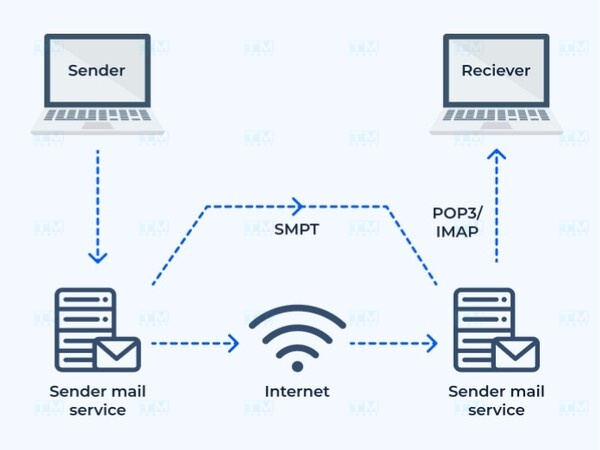
- Email processing: SMTP servers ensure email is sent from client to destination quickly and accurately.
- Email relay between servers: SMTP servers act as intermediaries, relaying email across networks and organizations.
- Security and authentication: Integrated security mechanisms prevent spam and protect against phishing attacks.
- Error management and reporting: Reports reasons when email fails to send (invalid address, unresponsive server).
Benefits of Using SMTP Servers

- Speed and efficiency: Email is sent quickly and securely, optimizing the transmission process.
- Better security: Supports SSL/TLS for data encryption, preventing man-in-the-middle attacks.
- Reduced spam risk: Automatic spam checking and filtering mechanisms.
- Error management and reporting: Provides detailed information about error causes and fixes.
- High customizability: Businesses can customize configurations to suit specific needs.
Practical Applications of SMTP
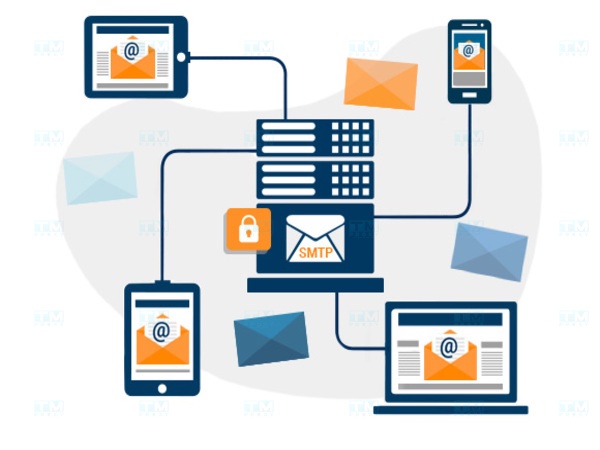
- Sending and receiving email: SMTP is the primary protocol used by Gmail, Outlook, Yahoo Mail.
- Email marketing: Helps send bulk marketing emails to the inbox instead of spam folder.
- Automated notification systems: CRM, e-commerce apps and project management systems use SMTP for automated notifications.
- Enterprise systems: Handles internal communications, important notifications and daily reports.
Gmail SMTP Configuration Guide
Step 1: Gather Configuration Information

Information needed to configure SMTP for Gmail:
- SMTP Server: smtp.gmail.com
- Port: 465 (SSL) or 587 (TLS)
- Security method: SSL or TLS
- Username: Your Gmail email address
- Password: App password (created in step 2)
Step 2: Create an App Password
- Sign in to your Google account, go to Security page.
- Enable 2-step verification if not already enabled.
- Select App passwords, choose "Mail" application and "Computer" device.
- Save the generated app password for use in SMTP configuration.
Step 3: Install WP Mail SMTP Plugin

- Log in to WordPress, go to Plugins > Add New, search for WP Mail SMTP and install.
- Go to Settings > WP Mail SMTP, select Other SMTP.
- Enter information: smtp.gmail.com, port 465/587, enable authentication.
- Enter Gmail address and app password, save settings and send a test email.
What is a Rotating Proxy? Benefits of Using Rotating Proxies
POP3 vs IMAP vs SMTP Comparison
| Criteria | POP3 | IMAP | SMTP |
|---|---|---|---|
| Primary function | Download email to client | Sync email between server and client | Send email |
| Email storage | Email usually deleted from server | Email stored on server and synced | No storage |
| Offline | Yes, downloaded email | Limited | Not supported |
| Multi-device | Limited | Full support | Not applicable |
| Security | SSL/TLS support | SSL/TLS support | SSL/TLS support |
| Main use | Download email to one device | Access email from multiple devices | Send email from client to server |
Conclusion: SMTP is the core protocol for email systems, ensuring email is sent quickly and securely. Understanding how to configure SMTP helps optimize email delivery for both individuals and businesses.