






LDAP Server is a system that implements the Lightweight Directory Access Protocol, used to store and manage user information in enterprise networks. This article explains what LDAP is, how it works, deployment models, authentication processes, and common applications.
High-Speed Proxy - Ready to Try?
ALGO Proxy offers residential, datacenter & 4G proxies in 195+ countries
What is an LDAP Server?
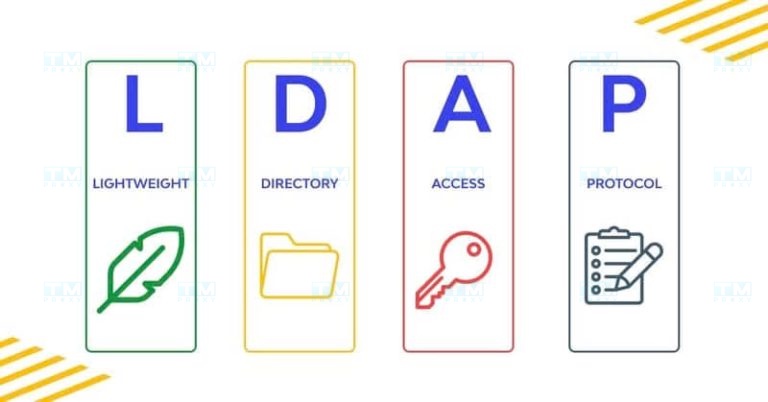
LDAP (Lightweight Directory Access Protocol) Server is a server system that implements the LDAP protocol, used to store, organize, and manage information within a computer network. An LDAP Server functions as a hierarchical database, enabling fast and efficient access to information about users, groups, and other resources on the network.
LDAP Server is designed to handle fast and efficient read queries, making it an ideal choice for storing directory information such as user directories, organizational structures, and system configuration settings. It provides a standardized interface for different applications to access and manage this information.
Key characteristics of an LDAP Server include:
- Hierarchical structure: Data is organized in a tree structure, making it easy to manage and search for information.
- Scalability: LDAP Server can handle large volumes of data and concurrent queries.
- High performance: Optimized for read operations, enabling rapid information retrieval.
- Flexibility: The schema can be customized to meet the specific needs of an organization.
- Security support: Provides authentication and encryption mechanisms to protect sensitive information.
How an LDAP Server Works
LDAP Server operates on a client-server model, where the LDAP server stores and manages data, while client applications send requests to access or modify information. The basic operating mechanism of an LDAP Server includes the following steps:
- Connection: The client establishes a connection with the LDAP Server via the TCP/IP protocol, typically using port 389 for non-secure connections or port 636 for SSL/TLS connections.
- Authentication: The client authenticates with the server by providing login credentials (such as username and password) or digital certificates.
- Performing operations: After successful authentication, the client can perform operations such as searching, adding, modifying, or deleting information in the LDAP database.
- Processing requests: The LDAP Server processes requests from the client, performs necessary operations on the database, and returns results.
- Returning results: The server sends the operation results back to the client.
- Closing the connection: After completing the necessary operations, the client closes the connection with the server.
LDAP Server uses several important concepts in its operating mechanism:
- Entry: The basic unit of information in LDAP, equivalent to a record in a relational database.
- Attributes: Properties that contain information about an entry.
- Distinguished Name (DN): A unique identifier for each entry in the LDAP tree.
- Schema: Defines the structure and rules for data stored in LDAP.
What is DNS Sinkhole? Applications and How to Use DNS Sinkhole Techniques
LDAP Classification Models
LDAP can be deployed according to various models, depending on the needs and scale of the organization. Below are some common LDAP classification models:
- Single Server Model:
- Uses only a single LDAP server.
- Suitable for small organizations or testing environments.
- Advantages: Simple, easy to manage.
- Disadvantages: Lacks high availability and scalability.
- Master-Slave Model:
- Uses one primary server (Master) and one or more secondary servers (Slave).
- The Master handles all write operations; Slaves only read and replicate data from the Master.
- Advantages: Improves read performance and availability.
- Disadvantages: Data replication latency may occur.
- Multi-Master Model:
- Multiple LDAP servers operate as Masters, capable of handling both read and write operations.
- Data is synchronized across servers.
- Advantages: High availability, good load balancing.
- Disadvantages: Complex management and conflict resolution.
- Distributed Model:
- Data is divided and stored across multiple different LDAP servers.
- Each server is responsible for a portion of the information tree.
- Advantages: Good scalability, suitable for large organizations.
- Disadvantages: Requires complex configuration and management.
- Federated Model:
- Combines multiple independent LDAP Servers into a unified system.
- Allows information sharing between different organizations.
- Advantages: Flexible, supports collaboration between organizations.
- Disadvantages: Can be complex in managing access rights and security.
Choosing the appropriate model depends on many factors such as organizational scale, performance requirements, availability, and scalability needs. Organizations can start with a simple model and evolve over time to meet growing demands.
Benefits of Using LDAP
Implementing an LDAP Server in an enterprise environment brings significant benefits:
- Centralized management:
- LDAP enables centralized management of user, group, and resource information.
- Minimizes data fragmentation and increases consistency across the organization.
- Improved performance:
- Optimized for fast read operations, enabling efficient information retrieval.
- Reduces the load on other systems by providing a centralized data source.
- Enhanced security:
- Provides a centralized access control point.
- Supports strong authentication and encryption mechanisms.
- Scalability:
- Can handle large volumes of data and concurrent queries.
- Easily scalable to meet the growing needs of the organization.
- Flexibility:
- Schema can be customized to meet the specific needs of the organization.
- Supports various types of data and applications.
- Standardization:
- LDAP is a standard protocol, supported by many applications and platforms.
- Increases compatibility and integration between systems.
- Cost reduction:
- Reduces management costs by centralizing account and access management.
- Many open-source LDAP solutions are available, saving licensing costs.
- Improved user experience:
- Supports Single Sign-On (SSO), allowing users to access multiple applications with a single set of credentials.
- Provides quick access to directory information and resources.
- Compliance support:
- Helps organizations easily track and manage access rights, supporting compliance with security and privacy regulations.
- Easy integration:
- Many enterprise applications support LDAP integration, simplifying system deployment and management.
With these benefits, LDAP Server has become an essential tool for managing information and authenticating users in modern enterprise environments.

LDAP Server Backend Database Systems
The backend database system plays a crucial role in storing and managing data for the LDAP Server. There are various types of backends, each with its own advantages and disadvantages. Below are some common backend types:
- BDB (Berkeley DB):
- A high-performance key-value database system.
- Advantages: Good performance, transaction support.
- Disadvantages: May encounter issues with large datasets.
- HDB (Hierarchical Database):
- An improved version of BDB, optimized for LDAP's hierarchical structure.
- Advantages: Better performance than BDB for subtree operations.
- Disadvantages: Still has some limitations when handling very large datasets.
- MDB (Memory-Mapped Database):
- Uses memory-mapping techniques to increase performance.
- Advantages: Very high performance, suitable for large datasets.
- Disadvantages: Requires significant RAM.
- LMDB (Lightning Memory-Mapped Database):
- An improved version of MDB, optimized for LDAP.
- Advantages: Extremely high performance, stable, supports ACID transactions.
- Disadvantages: May require significant disk space.
- SQL Backend:
- Uses SQL databases such as MySQL or PostgreSQL.
- Advantages: Flexible, easy to integrate with existing systems.
- Disadvantages: Performance may be lower compared to dedicated backends.
- LDIF Backend:
- Stores data in LDIF text file format.
- Advantages: Simple, easy to back up and restore.
- Disadvantages: Low performance, not suitable for large datasets or frequent updates.
Choosing the appropriate backend depends on many factors such as data scale, performance requirements, system resources, and the specific needs of the organization.
User Authentication Process in LDAP
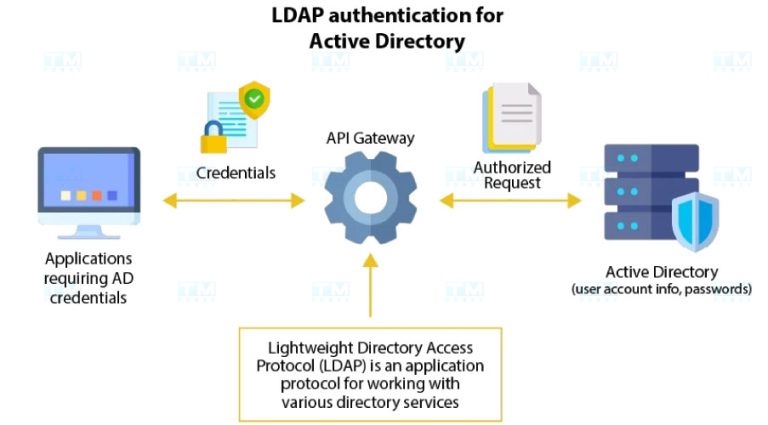
User authentication is one of the most important functions of an LDAP Server. The authentication process can be performed in various ways, depending on the security requirements and system configuration. Below are three common authentication methods in LDAP:
Anonymous Authentication
- Characteristics:
- Allows access to public information without providing login credentials.
- Commonly used for public directory applications.
- Process:
- The client connects to the LDAP Server without providing authentication credentials.
- The server allows access to information configured for anonymous access.
- Advantages:
- Simple, easy to deploy.
- Suitable for non-sensitive information.
- Disadvantages:
- Not secure for sensitive data.
- Difficult to control and monitor user activity.
Simple Authentication
- Characteristics:
- Uses a username (DN) and password for authentication.
- The most common authentication method in LDAP.
- Process:
- The client sends the user's DN and password to the LDAP Server.
- The server verifies the authentication credentials against stored data.
- If they match, the server grants access with corresponding permissions.
- Advantages:
- Easy to deploy and use.
- Widely supported by LDAP applications and libraries.
- Disadvantages:
- The password is sent in plain text and can be intercepted if SSL/TLS is not used.
SSL/TLS Authentication
- Characteristics:
- Uses the SSL/TLS protocol to encrypt the connection between client and server.
- Provides an additional security layer for the authentication process.
- Process:
- The client establishes an SSL/TLS connection with the LDAP Server.
- After the secure connection is established, the client sends authentication credentials.
- The server authenticates the user and grants corresponding access permissions.
- Advantages:
- High security, protects authentication credentials during transmission.
- Can be combined with client certificate authentication for enhanced security.
- Disadvantages:
- Requires SSL/TLS certificate configuration and management.
- May slightly affect performance due to encryption overhead.
Common Applications of LDAP Server
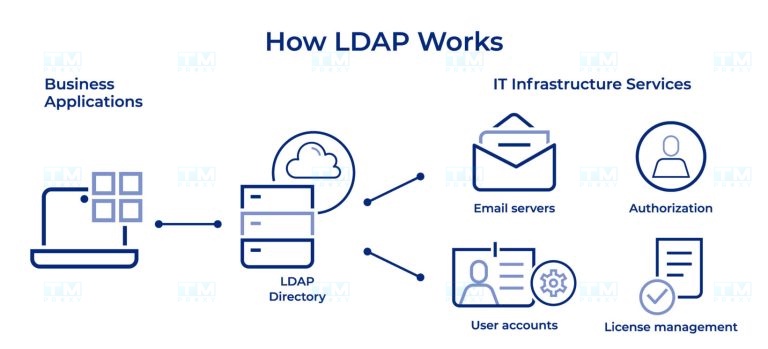
LDAP Server is widely used across many fields and applications. Below are some common applications:
- Enterprise directory management:
- Stores and manages contact information for employees, customers, and partners.
- Provides quick access to directory information for applications such as email and internal communications.
- Centralized authentication and authorization:
- Provides a single authentication source for multiple applications and services within the organization.
- Supports Single Sign-On (SSO) deployment, allowing users to access multiple applications with a single set of credentials.
- User account management:
- Centralizes the creation, modification, and deletion of user accounts.
- Manages user access rights and roles across the organization.
- System configuration management:
- Stores and manages configuration information for computers and network devices.
- Enables centralized and consistent configuration deployment across the network.
- Cloud service integration:
- Synchronizes user information between on-premise systems and cloud services.
- Supports seamless authentication for hybrid cloud applications.
- Digital certificate management:
- Stores and manages digital certificates and public keys.
- Supports Public Key Infrastructure (PKI) deployment within the organization.
- Network resource management:
- Stores information about network resources such as servers, printers, and network devices.
- Supports efficient resource management and allocation.
- Email system integration:
- Provides directory information and authentication for email systems.
- Supports email address auto-complete and directory search features.
- Security policy management:
- Stores and deploys centralized security policies.
- Supports consistent policy enforcement across the organization.
- Mobile application support:
- Provides authentication and information access for enterprise mobile applications.
- Supports security policy deployment for mobile devices.
{{< test-result title="Comparison of LDAP Deployment Models" headers="Model|Read Performance|Write Performance|Availability|Complexity" rows="Single Server|Medium|Medium|Low|Simple;Master-Slave|High|Medium|Medium|Medium;Multi-Master|High|High|High|Complex;Distributed|Very High|High|High|Very Complex;Federated|High|Medium|High|Complex" />}}
Conclusion: LDAP Server is an indispensable tool for information management and user authentication in enterprises. From simple models to Multi-Master, LDAP provides high flexibility, strong security, and good scalability. Choosing the appropriate backend and deployment model will help optimize performance and ensure system availability.