





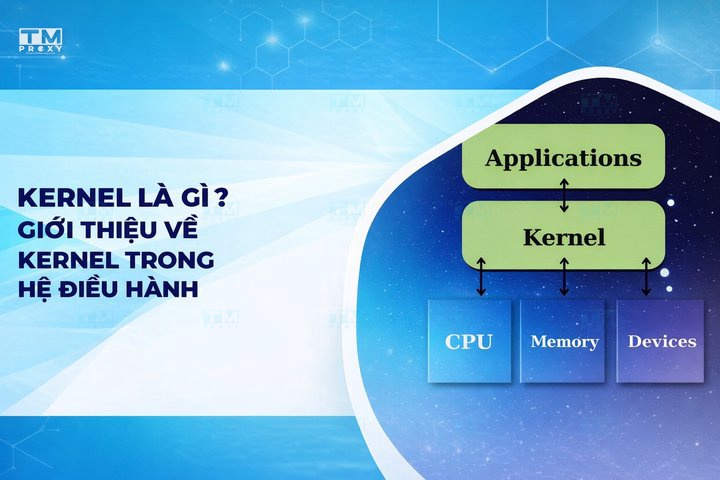
The Kernel (operating system core) is the central component that manages hardware resources and provides an interface for software. This article explains the types of kernels, their role in operating systems, and compares Kernel Mode vs User Mode.
What is a Kernel?
High-Speed Proxy - Ready to Try?
ALGO Proxy offers residential, datacenter & 4G proxies in 195+ countries
A Kernel, also known as the operating system core, is the most central and important component of an operating system. It acts as a bridge between computer hardware and software applications running on the system. The Kernel is designed to manage and coordinate all computer activities, from allocating system resources to handling requests from application software.
The Kernel is loaded into memory when the system boots and remains active until the computer is shut down. It is the first layer of software loaded after the firmware and bootloader, and it controls everything in the system. The Kernel has full access to all of the computer's hardware resources, including the CPU, memory, storage devices, and other peripheral devices.
Simply put, you can think of the Kernel as the "brain" of the operating system, controlling and managing every activity that takes place on your computer.
Position of the Kernel in the Operating System
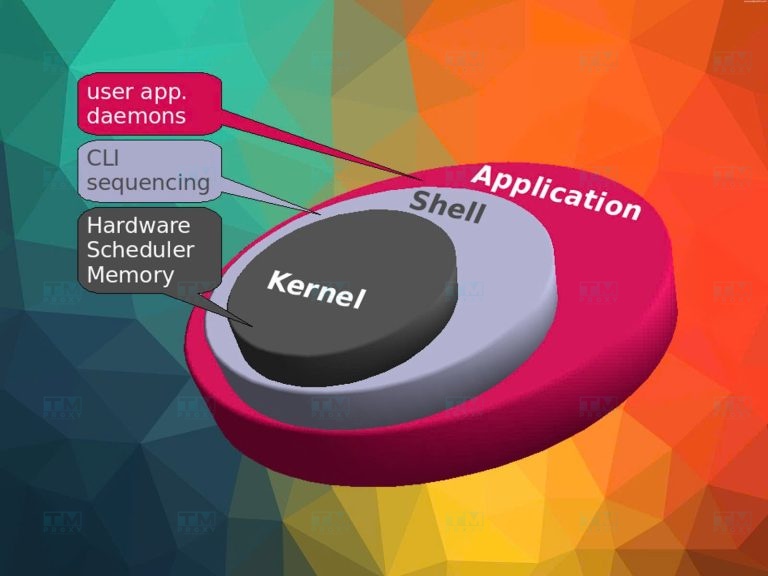
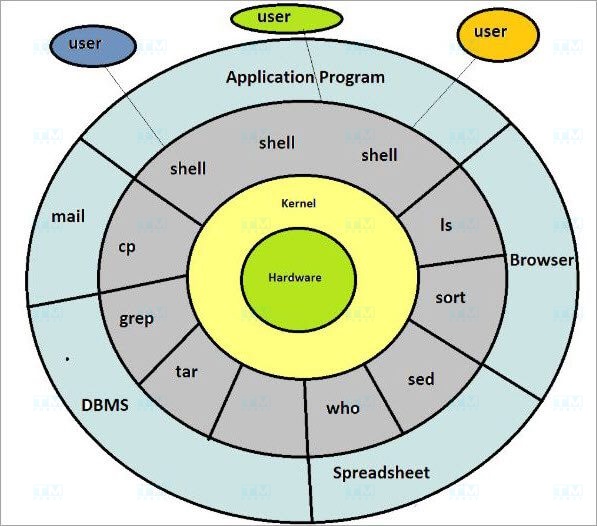
To better understand the position of the Kernel within the operating system, we can imagine the operating system as a multi-layered cake:
- Bottom layer: Computer hardware (CPU, RAM, hard drive, network card, etc.)
- Second layer: Kernel
- Third layer: System services and libraries
- Top layer: User applications
The Kernel sits at the center, between the hardware and application software. It acts as an abstraction layer, hiding the complexity of the hardware and providing a simple interface for software applications to interact with the hardware.
This special position allows the Kernel to:
- Directly control hardware
- Manage system resources
- Provide basic services to applications
- Ensure system safety and security
Thanks to this position, the Kernel can perform critical functions that no other component in the operating system is capable of.
What is a Samba Server? Installation and usage guide for Samba Server
Role of the Kernel in the Operating System
The Kernel plays a crucial role in ensuring the operating system runs smoothly and efficiently. Below are the main roles of the Kernel:
Managing Computer Resources
One of the most important tasks of the Kernel is managing computer resources. This includes:
- CPU Management: The Kernel decides which application runs, when, and for how long. It uses complex scheduling algorithms to ensure each application receives sufficient CPU time to operate efficiently.
- Memory Management: The Kernel controls the allocation and deallocation of RAM. It ensures each application has enough memory to function without affecting other applications. The Kernel also manages virtual memory, allowing the system to use more memory than the physical RAM capacity.
- Storage Management: The Kernel controls reading and writing data on storage devices such as hard drives and SSDs. It manages the file system, ensuring data is stored and retrieved efficiently and securely.
Resource Distribution and Sharing
The Kernel not only manages but also distributes and shares resources fairly and efficiently:
- Multitasking: The Kernel allows multiple applications to run simultaneously by rapidly switching between tasks, creating the illusion that all are running at the same time.
- Resource Sharing: The Kernel ensures that each application receives the necessary resources without affecting the performance of other applications.
- Synchronization: The Kernel manages concurrent access to shared resources, preventing conflicts and ensuring data consistency.
Managing Peripheral Devices
The Kernel also plays an important role in managing peripheral devices:
- Hardware Communication: The Kernel contains device drivers that allow the operating system to communicate with peripheral devices such as monitors, keyboards, mice, printers, and USB devices.
- Interrupt Handling: The Kernel processes interrupts from hardware, ensuring that requests from peripheral devices are handled promptly.
- Hardware Abstraction: The Kernel provides a unified interface for applications to interact with hardware, hiding the complexity and differences between device types.
Ensuring Security and Hardware Protection
Finally, the Kernel plays a critical role in ensuring security and protecting the system:
- Access Control: The Kernel enforces security policies, controlling application access to system resources and data.
- Application Isolation: The Kernel ensures that applications cannot interfere with each other's operations or gain unauthorized access to each other's memory.
- Hardware Protection: The Kernel prevents applications from directly accessing hardware, protecting the system from potentially harmful activities.
- Error Handling: The Kernel has the ability to detect and handle system errors, preventing issues from spreading and protecting system integrity.

Types of Kernels
In the field of operating systems, there are several types of kernels, each with its own design and characteristics. Below are some of the most common kernel types:
Monolithic Kernel
Monolithic Kernel is the most traditional and widely used type of kernel. In this architecture, the entire operating system runs in kernel space with full access to hardware.
Characteristics:
- All system services run in kernel mode
- High performance due to direct access to hardware resources
- Large and complex in size
- Difficult to maintain and extend
- Examples: Linux, traditional Unix
Advantages:
- High performance
- Direct interaction between components
Disadvantages:
- Difficult to maintain and debug
- A bug in any part can crash the entire system
Microkernel
Microkernel is a minimalist kernel design that includes only the most basic functions. Other system services run as user-space processes.
Characteristics:
- Compact kernel containing only essential functions
- Most system services run in user mode
- Communication between components via message passing
- Examples: MINIX, QNX
Advantages:
- Easy to maintain and extend
- Enhanced reliability and security
Disadvantages:
- Lower performance due to message passing overhead
- More complex design
Hybrid Kernel
Hybrid Kernel is a combination of Monolithic Kernel and Microkernel, aiming to leverage the advantages of both types.
Characteristics:
- Some services run in kernel mode, others in user mode
- Balances performance and modularity
- Examples: Windows NT, macOS (XNU kernel)
Advantages:
- Flexible design
- Balances performance and maintainability
Disadvantages: Can be complex in deciding what should run in kernel space
Nanokernel
Nanokernel is an extremely minimalist version of a microkernel, providing only the most basic functions.
Characteristics:
- Very small in size
- Provides only the most basic mechanisms such as scheduling and IPC
- Most functions are implemented in user space
- Example: KeyKOS
Advantages:
- Extremely safe and reliable
- Easy to verify correctness
Disadvantages:
- Performance can be significantly affected
- Difficult to develop complex applications
Exokernel
Exokernel is an extremely minimalist kernel design focused on providing hardware resource control to applications.
Characteristics:
- The kernel only ensures resource protection and sharing
- Applications have direct control over hardware resources
- Operating system libraries (libOS) provide high-level abstractions
- Example: MIT Exokernel
Advantages:
- Extremely high performance for optimized applications
- Maximum flexibility for application developers
Disadvantages:
- Difficult to develop applications due to lack of abstraction
- Can cause security issues if not managed carefully

Comparison of Kernel Mode and User Mode
To better understand how the Kernel operates, we need to distinguish between Kernel Mode and User Mode. These are the two main operating modes in modern operating systems.
| Criteria | Kernel Mode | User Mode |
|---|---|---|
| Definition | Highest privilege, full hardware access | Limited privileges, runs user applications |
| Access Rights | Direct access to memory and hardware | Indirect via OS API |
| Memory Space | Entire memory space | Only allocated portion |
| Instruction Execution | All CPU instructions | Only non-privileged instructions |
| Error Handling | Can crash the entire system | Only affects the running application |
| Security | Kernel protects itself | Protected by the kernel |
| Examples | Memory management, CPU scheduling, interrupt handling | Running applications, data processing |
| Kernel Type | Performance | Security | Maintainability | Examples |
|---|---|---|---|---|
| Monolithic | Very High | Medium | Difficult | Linux, Unix |
| Microkernel | Medium | High | Easy | MINIX, QNX |
| Hybrid | High | High | Medium | Windows NT, macOS |
| Nanokernel | Low | Very High | Easy | KeyKOS |
| Exokernel | Extremely High | Low | Very Difficult | MIT Exokernel |
Monolithic Kernel (Linux) remains the most popular thanks to its high performance. Hybrid Kernel is chosen by Windows and macOS to balance performance and security.
This separation enhances system security and stability by preventing user applications from directly interfering with hardware or system memory.
Conclusion: The Kernel is the core component of every operating system, managing hardware resources and providing an interface for software. Understanding the different kernel types and how they work helps you make the right decisions when choosing an operating system and designing systems.