





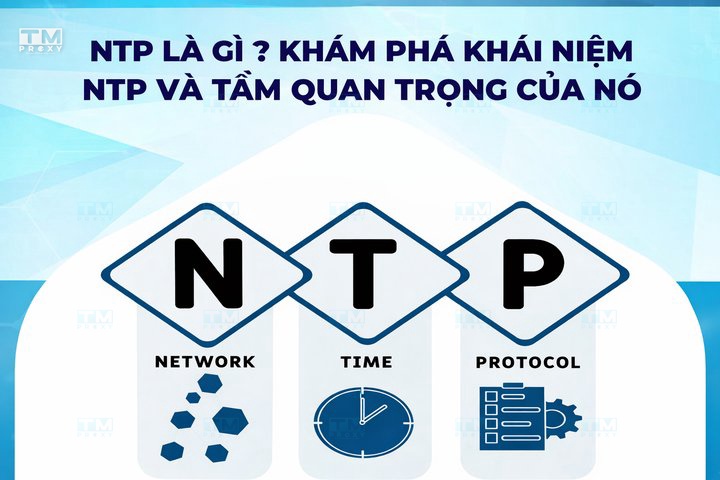
NTP (Network Time Protocol) is a protocol that synchronizes time between computer systems over a network. This article explains how NTP works, stratum levels, and provides a guide to configuring an NTP Server.
What is NTP?
High-Speed Proxy - Ready to Try?
ALGO Proxy offers residential, datacenter & 4G proxies in 195+ countries
NTP, short for Network Time Protocol, is a network protocol designed to synchronize the clocks of computer systems over data networks with variable latency. Developed by David L. Mills of the University of Delaware, NTP has become one of the oldest protocols still widely used on the Internet today.
NTP uses the Marzullo algorithm along with UTC time to ensure that all network-connected devices are synchronized with high accuracy, typically within a few milliseconds of UTC. This is particularly important in systems requiring high time precision, such as financial systems, security systems, and scientific applications.
What is an NTP Server?
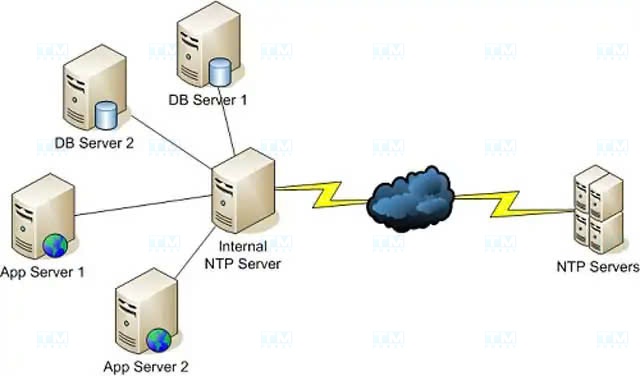
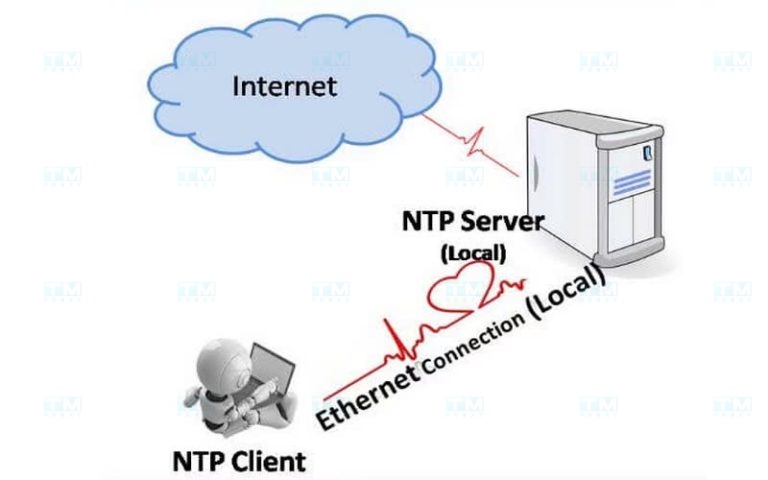
An NTP Server is a computer configured to provide time synchronization services to other devices on the network. NTP servers are typically connected to an accurate time source, such as an atomic clock or GPS, and then distribute this time information to NTP clients.
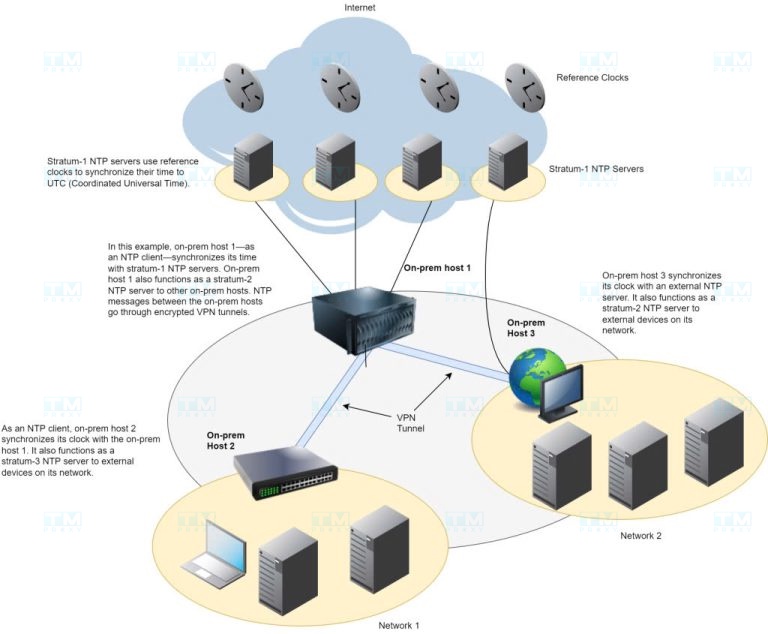
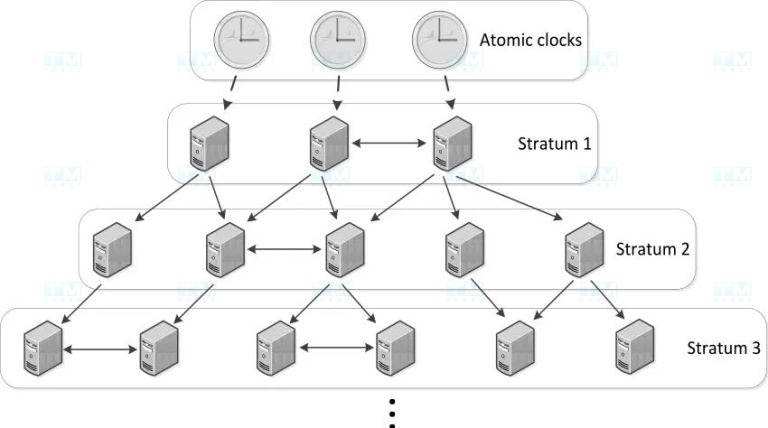
NTP servers can be classified into multiple levels called stratum, based on their distance from the most accurate time source. Stratum 0 represents primary reference devices such as atomic clocks, while Stratum 1 refers to NTP servers directly connected to Stratum 0 devices.
How NTP Servers Work
NTP operates on a client-server model. When an NTP client needs to synchronize its time, it sends a packet to the NTP server. This packet contains the client's timestamp at the time of sending. The NTP server receives the packet, adds its own timestamp, and sends it back to the client.
The process works as follows:
- The client sends a packet with timestamp T1.
- The packet arrives at the server at time T2.
- The server sends a reply packet at time T3.
- The client receives the reply packet at time T4.
From these four timestamps, the client can calculate:
- Round-trip delay: ((T4 – T1) – (T3 – T2)) / 2
- Time offset: ((T2 – T1) + (T3 – T4)) / 2
Based on this information, the client can adjust its clock to match the NTP server's time.
NTP uses several sophisticated techniques to ensure high accuracy, including:
- Noise filtering: NTP uses algorithms to discard inaccurate time samples.
- Clock selection: When multiple NTP servers are available, the client selects the server with the most stable and accurate time.
Gradual adjustment: Instead of making abrupt changes, NTP typically adjusts the clock gradually to avoid causing issues with running applications.
Key Functions of an NTP Server
An NTP Server is more than just a time synchronization tool. It provides many other important functions that contribute to effective network management and security. Here are the key functions of an NTP Server:
Scheduled Data Backup
NTP Server plays a critical role in ensuring that automated data backup processes run at the scheduled times. When all devices on the network are accurately synchronized, scheduling and executing backups becomes more reliable. This is especially important in large enterprise environments where regular and timely data backups are essential to ensure business continuity.
Improving Network Speed
By synchronizing time across all devices on the network, NTP Server helps optimize network performance. When devices share the same accurate time, network protocols like TCP/IP can operate more efficiently. For example, calculating latency and round-trip time becomes more accurate, thereby improving the overall network performance.
Network Management System Monitoring
NTP Server plays a vital role in supporting network monitoring and management systems. By providing accurate and synchronized time to all devices, NTP Server helps network administrators track and analyze network events accurately. This is particularly useful in identifying and troubleshooting issues, as well as optimizing network performance.
Intrusion Analysis
In the field of network security, accurate time is a key factor in detecting and analyzing security incidents. NTP Server ensures that all security logs and system events are recorded with accurate timestamps. This helps security experts precisely reconstruct the chain of events in case of a network intrusion or attack, thereby supporting more effective investigation and remediation.
Ensuring Regulatory Compliance
Many industries, particularly in finance and healthcare, have strict regulations about recording and storing data with accurate timestamps. NTP Server plays an important role in ensuring compliance with these regulations by providing accurate and reliable time to all systems in the network. This helps organizations avoid legal and financial penalties for non-compliance.

The Importance of NTP Server
The importance of NTP Server in modern technology environments cannot be overstated. Here are the main reasons why NTP Server plays a crucial role:
- Accurate synchronization: NTP Server ensures that all devices on the network share the same accurate time. This is extremely important in many applications, from financial transactions to industrial control systems.
- Supporting distributed applications: In the era of cloud computing and distributed systems, synchronizing time between servers in different geographic locations is critical to ensuring data consistency.
- Optimizing network performance: By synchronizing time, NTP Server helps improve the performance of network protocols, especially in environments requiring low latency.
- Supporting security: Accurate time is necessary for many security protocols, such as Kerberos. NTP Server ensures that these protocols operate reliably.
- Regulatory compliance: In many industries, maintaining accurate time is a legal requirement. NTP Server helps organizations meet these requirements easily.
- Accurate data analysis: In big data analytics and machine learning, accurate time is necessary to ensure the consistency and accuracy of data collected from multiple sources.
- Debugging and troubleshooting: When issues occur, having accurate time on all devices helps IT engineers easily reconstruct and analyze the chain of events leading to the problem.
- Supporting real-time applications: Many real-time applications, such as intelligent transportation systems or industrial control systems, require accurate time synchronization to operate effectively.
What is an IP Address? Advantages, Disadvantages, and How It Works

Understanding NTP Server Stratum Levels
In the NTP system, servers are classified into levels called "Stratum." The Stratum concept is used to determine the accuracy and reliability of an NTP server. Below is a detailed explanation of the Stratum levels:
- Stratum 0:
- This is not an actual NTP server but rather the most accurate time reference devices.
- Includes devices such as atomic clocks, GPS clocks, or radio time-measuring devices.
- These devices provide the most accurate time source for the NTP system.
- Stratum 1:
- These are NTP servers directly connected to Stratum 0 devices.
- Often called primary time servers.
- Have the highest accuracy among actual NTP servers.
- Usually maintained and protected by large organizations or government agencies.
- Stratum 2:
- These servers synchronize time from Stratum 1 servers.
- Commonly used in large enterprise networks.
- Provide high accuracy while reducing the load on Stratum 1 servers.
- Stratum 3:
- Synchronize from Stratum 2 servers.
- Common in medium and small-sized networks.
- Still provide sufficient accuracy for most typical applications.
- Stratum 4-15:
- Subsequent levels, each synchronizing from the level above.
- Accuracy decreases with each lower level.
- Stratum 15 is the lowest level defined in the NTP protocol.
- Stratum 16:
- Represents an unsynchronized or not-yet-synchronized server.
- Typically used to indicate that the server cannot provide reliable time information.
| NTP Server | Stratum | Average Latency | Time Offset | Stability |
|---|---|---|---|---|
| pool.ntp.org | 2-3 | 15ms | ±2ms | High |
| time.google.com | 1 | 35ms | ±1ms | Very High |
| time.windows.com | 2 | 42ms | ±3ms | High |
| time.apple.com | 2 | 40ms | ±2ms | High |
pool.ntp.org has the lowest latency due to having servers near Vietnam. time.google.com is the most accurate thanks to Stratum 1 but has higher latency.
What is a Public NTP Server?
A Public NTP Server is an NTP server made freely available for public use. It is an important part of Internet infrastructure, helping maintain time synchronization on a global scale. Here are some important points about Public NTP Servers:
Purpose:
- Provide an accurate and reliable time source for anyone who needs to synchronize time on their devices.
- Support small organizations or individuals who cannot maintain their own NTP servers.
Providers:
- Many large and reputable organizations provide Public NTP Servers, including universities, major technology companies, and non-profit organizations.
- Notable examples include pool.ntp.org, time.google.com, time.windows.com, and time.apple.com.
Advantages:
- Free and easy to use.
- Typically highly reliable and maintained by experts.
- Widely distributed globally, helping reduce latency.
What is Apache Spark? An Overview of the Powerful Data Processing Platform
Disadvantages:
- May become overloaded in some cases.
- No guarantees on response time or accuracy compared to a private NTP server.
- May not be suitable for applications requiring high security or strict regulatory compliance.
How to use:
- Can be easily configured on most operating systems and network devices.
- Usually only requires adding the Public NTP Server address to the device's NTP configuration.
Usage considerations:
- You should use multiple Public NTP Servers to ensure reliability.
- Check the provider's terms of use, as some may have query limits.
- Consider using an NTP pool service (like pool.ntp.org) instead of a specific server to distribute the load more evenly.
Security:
- While Public NTP Servers are generally safe, be aware that they can be exploited in certain types of network attacks.
- You should configure firewalls and other security measures to mitigate risks.
Detailed NTP Server Configuration Guide
Configuring an NTP Server is an important process to ensure accurate time synchronization in your network. Below is a detailed guide on how to configure an NTP Server on a Windows system:
- Stop the Windows Time service in Services:
- Open Run (Windows + R) and type services.msc to open Services Manager.
- Find the "Windows Time" service in the list.
- Right-click on the service and select "Stop" to pause the service.
- Edit W32time in Regedit:
- Open Run and type regedit to open Registry Editor.
- Navigate to: HKEY_LOCAL_MACHINE\SYSTEM\CurrentControlSet\Services\W32Time\Parameters.
- Find and edit the value of "NtpServer" to the list of NTP servers you want to use, for example: pool.ntp.org,0x1 time.windows.com,0x1 time.google.com,0x1
- Navigate to: HKEY_LOCAL_MACHINE\SYSTEM\CurrentControlSet\Services\W32Time\Config.
- Change the value of "AnnounceFlags" to 5.
- Create a new DWORD value named "EventLogFlags" and set the value to 3.
- Restart the W32Time service:
- Return to Services Manager.
- Find the "Windows Time" service.
- Right-click and select "Start" to restart the service.
- Configure the Firewall:
- Open Windows Defender Firewall with Advanced Security.
- Select "Inbound Rules" and create a new rule.
- Select "Port" and enter port 123 (the default port for NTP).
- Select "Allow the connection" and apply to all network profiles.
- Set time on the NTP Server and configure Time Zone:
- Open Control Panel and select "Date and Time."
- Select the "Internet Time" tab and click "Change settings."
- Select "Synchronize with an Internet time server" and enter the address of the NTP Server you want to use.
- Click "Update now" to synchronize immediately.
- In the "Time Zone" tab, ensure that the time zone is correctly set for your location.
Important notes:
- After configuration, you should verify that the time is synchronized correctly by comparing it with a reliable time source.
- For critical systems, consider using multiple NTP Servers to ensure higher reliability.
- Periodically check and update the NTP configuration to ensure optimal performance.
Conclusion: NTP is an essential protocol in modern network infrastructure, ensuring accurate time synchronization for financial transactions, security analysis, and the operation of distributed systems. Properly configuring NTP with multiple source servers helps improve system reliability.