





Cloud Hosting is a web hosting service built on cloud computing that distributes resources across multiple servers to ensure high uptime and flexible scalability. This article provides comprehensive knowledge about Cloud Hosting, its types, pros and cons, and key evaluation criteria.
High-Speed Proxy - Ready to Try?
ALGO Proxy offers residential, datacenter & 4G proxies in 195+ countries
What is Cloud Hosting?
Cloud Hosting is a type of web hosting service built on cloud computing. Instead of relying on a single physical server like traditional hosting, Cloud Hosting virtualizes and distributes server resources across multiple servers. When one server encounters an issue, the other servers continue operating normally to ensure your website stays online.
By leveraging virtualization technology and distributed server systems, Cloud Hosting can flexibly adjust and provision resources based on the actual needs of your website. This enhances stability, load-bearing capacity, and saves costs compared to traditional hosting.

How Cloud Hosting Works
To better understand how Cloud Hosting works, think of a distributed virtualized server system. The service provider builds server clusters that combine hardware and software. The hardware consists of powerful bare metal servers. Virtualization software installed on these physical servers divides resources such as CPU, RAM, and storage into multiple independent VPS (Virtual Private Server) instances.
When a user subscribes to Cloud Hosting, the system automatically provisions a VPS with resources based on the selected hosting plan. All files and databases for the website are stored and processed on this VPS. The key difference from standard VPS hosting is that Cloud VPS resources can be easily modified and flexibly scaled without disrupting the service.
Additionally, thanks to Cloud virtualization, if a physical server encounters a problem, the VPS instances on it are quickly migrated to another server (live migration) without affecting operations. This feature gives Cloud Hosting extremely high uptime (up to 99.99%) while minimizing the risk of data loss.

Types of Cloud Hosting
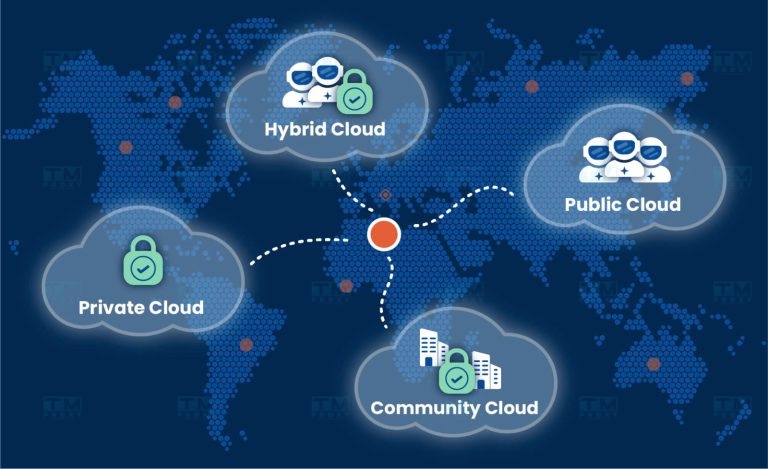
Cloud Hosting applies cloud computing technology, delivering a superior experience for users with fast and efficient data transfer and storage capabilities. Currently, there are four popular cloud storage models widely in use.
Public Cloud
Public Cloud is a cloud service provided by a third party, typically cloud service providers. It is the most popular cloud hosting model today.
Public Cloud stands out for its large scalability, effectively meeting sudden spikes in traffic demand. However, since the servers are owned by the provider, users are dependent on them, so careful selection of a suitable provider is essential.
Private Cloud
Private Cloud is a cloud model built and used exclusively by an enterprise, not shared with any third party. The greatest strength of this model is its comprehensive control and high level of security for operations on the internal cloud platform.
However, deploying Private Cloud requires significant budget and human resources. Enterprises need to invest in powerful server systems, housed in dedicated data centers, along with a specialized team to operate and manage the system.
Hybrid Cloud
Hybrid Cloud is the combination of two or more cloud types (private, public, or community), operating as separate entities but able to connect and interact with each other, leveraging the advantages of each deployment model. Hybrid Cloud allows customers to access cloud resources to locate, manage, or use services flexibly. However, hybrid cloud services cannot be confined to a single cloud type (private, public, or community).
The adoption of Hybrid Cloud depends on various factors, such as data security needs, the level of management required, and how the enterprise uses applications. A typical example is "Cloud Bursting" — a deployment model where an application runs on a private cloud or data center but expands to the public cloud when demand for computing resources spikes.
Community Cloud
Community Cloud is an infrastructure model shared among multiple enterprises or organizations within the same community, based on common factors such as security, regulatory compliance, and privacy.
This model is typically suited for communities with shared goals or specific requirements, such as enterprises in the same industry, non-profit organizations, or government agencies. On a Community Cloud, members share infrastructure resources like storage, networking, and hardware, helping optimize costs and efficiently leverage resources.
Community Cloud is usually managed by an independent service provider or an external organization. This ensures professional operations and compliance with security and privacy standards.
Considerations when using Community Cloud:
- Financial factors and investment capacity should be assessed.
- This model is not yet fully optimized and is not yet widely adopted.
Advantages:
- Higher security than Public Cloud.
- Cost sharing among organizations.
- Enhanced collaboration within the community.
Affordable rotating proxy in Vietnam with large capacity and high security
Disadvantages:
- Less flexible than Public Cloud.
- Complex management with multiple participating parties.
Distributed Cloud
Distributed Cloud is a model in which cloud services and resources are distributed across multiple geographic locations but are still centrally managed by a single provider. This model allows services to be delivered closer to users, minimizing latency and improving performance, making it especially suitable for organizations operating across multiple regions or countries.
Distributed Cloud is based on a cloud computing architecture that uses a collection of computers at different locations. This model is divided into two types:
- Public-Resource Computing: Leverages public resources to create a shared cloud environment.
- Volunteer Cloud: Users voluntarily contribute personal computing resources to build a cloud network.
Advantages:
- High performance.
- Significantly reduced latency.
- Suitable for globally distributed systems.
Disadvantages:
- Complex management due to resource distribution.
- High deployment and maintenance costs.
Big Data Cloud
Big Data Cloud is a cloud model specifically designed to process and analyze large volumes of data (Big Data). With the ability to provide powerful computing resources and optimized storage space, Big Data Cloud helps enterprises efficiently leverage data, supporting data-driven decision making.
This model is typically integrated with distributed data processing tools such as Hadoop, Spark, and NoSQL, enabling fast and efficient data processing at scale.
Advantages:
- Efficient processing and analysis of large data sets.
- Optimized computing performance for complex tasks.
Disadvantages: Requires highly specialized skills to manage data and use analytical tools.
Multi-Cloud
Multi-Cloud is a strategy of deploying multiple cloud service providers simultaneously to leverage the strengths of each platform and reduce dependency on a single provider.
By using services from leading providers like AWS, Azure, or Google Cloud, enterprises can enhance flexibility, optimize costs, and ensure operational performance. Multi-Cloud also minimizes the risk of service downtime when one provider encounters issues.
Advantages:
- Increased flexibility in service selection.
- Reduced risk by avoiding dependency on a single provider.
- Optimized performance and cost by choosing the most suitable services.
Disadvantages:
- Complex management due to integrating and maintaining multiple platforms.
- Requires highly specialized skills for effective operation.
HPC Cloud
HPC Cloud (High-Performance Computing Cloud) is designed to provide high-performance computing resources for complex tasks such as scientific simulations, financial modeling, or big data analysis.
This model allows organizations to access powerful computing resources through cloud service providers without investing in expensive hardware infrastructure.
Advantages:
- High computing performance, suitable for intensive tasks.
- Reduced hardware investment costs, paying only based on usage needs.
Disadvantages:
- Operational costs can be high with continuous use.
- Requires deep technical skills to leverage and optimize resources.
Pros and Cons of Cloud Hosting
Cloud Hosting offers many advantages in terms of flexibility, performance, and cost savings, but it also comes with challenges such as security concerns, long-term costs, and management complexity.
Advantages
- Flexibility and Scalability: Cloud Hosting allows easy adjustment of resources such as CPU, RAM, and storage capacity based on usage needs. This is ideal for websites or applications with fluctuating traffic.
- High Performance: Cloud Hosting uses a network of servers that distribute workloads evenly, minimizing overload situations. The system can handle large traffic volumes without affecting speed or user experience.
- Reliability and Redundancy: If one server encounters an issue, other servers in the system automatically take over, ensuring uninterrupted service and minimizing downtime.
- Pay-as-you-go: With Cloud Hosting, you only pay for the resources you actually use, optimizing costs, especially when you don't need constant fixed resources.
- Automatic Updates and Maintenance: Cloud Hosting providers automatically update software, security patches, and maintain the system, reducing the burden on users.
- Global Accessibility: Cloud Hosting allows users to access resources from anywhere with an Internet connection, providing high flexibility for system administrators.
Disadvantages
- Rising Costs: Although the pay-as-you-go model provides flexibility, when resource demand increases and persists, costs can escalate quickly. This can become difficult to manage for websites or applications with high traffic.
- Security and Control Limitations: With Cloud Hosting, your data and applications are stored on the provider's servers, which can raise security concerns, especially with sensitive data. Additionally, your direct control over the system is limited.
- Internet Dependency: Cloud Hosting requires an Internet connection to access and manage services. If the network encounters issues or connection speed is slow, system performance and accessibility will be affected.
- Complex Management: For organizations with complex service requirements, managing Cloud Hosting may require specialized technical and resource management knowledge, especially in Hybrid or Multi-Cloud environments.
- Vendor Lock-in: When using Cloud Hosting services from a specific provider, switching to another provider can be difficult and costly due to dependency on the original provider's proprietary systems and technology.

When Should You Use Cloud Hosting?
Cloud hosting is a flexible and powerful solution, suitable for many types of businesses — from large companies like Netflix that need high performance, large bandwidth, and maximum uptime, to startups with needs for scaling traffic and service quality.
With its flexibility, cloud hosting provides suitable options for organizations ranging from large enterprises to individuals who own high-traffic blogs.
For large organizations, cloud hosting is an ideal solution to ensure near-perfect uptime and the ability to find suitable servers without encountering latency. Quality cloud hosting providers can offer not only robust security but also extremely fast website performance.
Cloud Hosting is also well-suited for website owners with steady traffic. In the event of a sudden traffic spike, the service can help prevent the website from slowing down or going offline. If you face higher traffic volumes, renting a virtual or dedicated server is an option, but it may not provide the flexible scalability that cloud services offer.
However, depending on the service provider, you may need various technical skills to effectively manage your cloud servers. Some providers may require deep technical knowledge to optimize and maintain the system.

Key Specifications to Know When Choosing Cloud Hosting
To choose the right Cloud Hosting plan, you need to understand the meaning and role of several important technical specifications. Here are the basic specs to know:
Disk Space
Disk Space refers to the virtual hard drive capacity allocated to your Cloud VPS. This capacity determines the space you have for storing images, videos, source code, and website data. Plan your Disk Space according to your website's storage needs.
Bandwidth
Bandwidth refers to the maximum amount of data that can be transferred over a network connection in a given period of time. It is usually measured in GB/month. Bandwidth affects the number of concurrent visitors to your website. For high bandwidth needs, consider a hosting plan with unlimited bandwidth.
Sub Domain
Sub Domains are secondary domains created from the main domain. For example: blog.domain.com, shop.domain.com are sub domains of domain.com. This is an important specification for websites that need multiple separate sections.
Addon Domain
Addon Domain is the number of separate domains that can be added to your existing hosting. Addon domains are completely independent in content and management from the main domain. This feature is ideal for running multiple websites on a single hosting account.
Parked Domain
Parked Domain refers to domains that only redirect to the main domain, serving to protect your brand or capture traffic from multiple domains. Parked domains do not have their own storage space or content.
Email Accounts
This is the number of email@your-domain accounts you can create on your hosting. Most users rarely use hosting email, so keep this criterion in mind. Hosting with more email accounts is typically more expensive.

Comparison of Cloud Hosting, Web Hosting, and VPS
Traditional web hosting typically stores all website data and content on a single server. When users access the website's domain, the content is loaded into the browser from that server.
Web hosting has four main types, including shared hosting, dedicated server hosting, managed hosting, and virtual private server (VPS).
With shared hosting, a single server is shared among multiple websites. This is the most cost-effective option because server costs are divided among the websites. However, the major limitation of shared hosting is limited scalability, since all websites depend on the resources of a single server.
If you want to avoid this issue, you can choose dedicated hosting, which allows you to rent one or more dedicated servers to run your website or application without sharing with any other website. However, the downside is that you must manage and take full responsibility for all issues related to the dedicated server.
Below is a detailed comparison table of the similarities and differences between Web Hosting, VPS, and Cloud Hosting:
| Criteria | Cloud Hosting | Web Hosting | VPS (Virtual Private Server) |
|---|---|---|---|
| Definition | Resources are distributed across multiple servers, allowing flexible scaling. | A web hosting service on a single server. | A physical server is divided into multiple virtual servers, providing dedicated resources for each VPS. |
| Flexibility | Highly flexible, easy to scale resources up or down. | Less flexible, typically limited in capacity and resources. | More flexible than Web Hosting but less than Cloud Hosting. |
| Performance | High performance through load distribution across multiple servers. | Average performance, may decrease with high traffic. | Better performance than Web Hosting due to dedicated resources. |
| Reliability | Very high, automatic resource failover when issues occur. | Lower, if the server fails, all services may be affected. | High, but not as much as Cloud Hosting, since it depends on a physical server. |
| Management | Requires less technical skill thanks to automation and provider management. | Easy to manage, suitable for beginners. | Requires technical knowledge for configuration and management. |
| Cost | Costs can increase with usage, typically higher than Web Hosting. | Low cost, suitable for small websites. | Mid-range cost, depending on configuration and resources. |
| Security | High security through distributed technology and professional management. | Basic security, typically lower than VPS and Cloud Hosting. | Better security than Web Hosting thanks to dedicated resources. |
| Use Cases | Suitable for businesses with rapid and fluctuating scaling needs. | Suitable for personal or small websites. | Suitable for applications requiring high performance and better control. |
| Backup & Recovery | Provides automatic backup and recovery features. | Usually requires manual backup. | Backup can be set up but is not automatic. |
When to Choose Each Hosting Type
- Choose Cloud Hosting when: You need a flexible solution that can scale quickly, with high performance and security requirements.
- Choose Web Hosting when: You have a small website, a limited budget, and no high performance requirements.
- Choose VPS Hosting when: You need a solution with higher performance than Web Hosting but don't need the flexibility of Cloud Hosting.
Although VPS and Cloud Hosting share many similarities in customizability and both are maintained by the provider, Cloud Hosting has the advantage of scalability, flexibility, and reliability thanks to its extensive server network. Cloud Hosting also delivers higher performance and speed than VPS, particularly thanks to features like Content Delivery Networks (CDN).

Additional Questions About Cloud Hosting
Who is Cloud Hosting Best Suited For?
Cloud Hosting is a flexible, reliable, and easily scalable hosting solution suitable for a wide range of users, from individuals to large enterprises. Here are some specific audiences that can benefit from Cloud Hosting:
- Medium and large enterprises: Businesses with rapid and flexible scaling needs will find Cloud Hosting an ideal solution. With the ability to automatically scale resources based on traffic, Cloud Hosting helps maintain stable performance even under heavy traffic loads.
- E-commerce websites: Online stores need to ensure high availability and reliability to serve customers 24/7. Cloud Hosting handles multiple concurrent transactions without interruption.
- Startups: New projects need flexibility and scalability as they grow. Cloud Hosting helps startups save on initial costs and easily upgrade when growth demands increase.
- Application developers: Cloud Hosting provides a flexible environment for developers to test and deploy without worrying about hardware, while easily customizing to their requirements.
- Education and e-learning platforms: eLearning and online education platforms need global accessibility and the ability to handle many concurrent users. Cloud Hosting effectively meets these requirements.
- Websites with fluctuating traffic: Websites with highly variable traffic, such as blogs, online events, or marketing campaigns, benefit from Cloud Hosting's flexible scaling capabilities.
Why Choose Cloud Hosting?
Cloud Hosting offers many important benefits for both individuals and businesses.
First, Cloud Hosting provides flexibility and scalability, allowing you to easily adjust resources as needed without investing in new hardware. This is especially useful for businesses with unpredictable traffic patterns. Cloud Hosting's distributed server system increases reliability and minimizes downtime.
Another advantage of Cloud Hosting is cost efficiency, as you only pay for the resources you actually use. Furthermore, Cloud Hosting improves performance, speeds up page loading, and provides enhanced security through advanced data protection technologies from the provider.
Cloud Hosting also makes management easier with user-friendly tools and remote access capabilities, allowing you to work flexibly from anywhere with an Internet connection.
How Do IaaS, PaaS, and SaaS Relate to Cloud Hosting?
Cloud Hosting is a key component of the three main cloud computing service models: IaaS (Infrastructure as a Service), PaaS (Platform as a Service), and SaaS (Software as a Service). Each of these models uses Cloud Hosting to provide infrastructure and platforms for their services:
- IaaS (Infrastructure as a Service): This model provides virtualized server infrastructure over the Internet, allowing users to rent resources such as servers, storage, and networking without managing physical hardware. Cloud Hosting is considered a form of IaaS because it provides cloud infrastructure for data storage and running applications. Users can easily scale resources and only pay for what they use.
- PaaS (Platform as a Service): PaaS provides a development and deployment environment for applications without requiring users to manage infrastructure. Cloud Hosting serves as the foundational infrastructure for PaaS, providing the tools and services developers need to build, test, and deploy applications.
- SaaS (Software as a Service): SaaS delivers software over the Internet, enabling users to access applications without installing them on personal devices. SaaS applications are typically deployed on Cloud Hosting platforms, allowing users to access from anywhere with an Internet connection and ensuring the software is always maintained and updated.
Conclusion: Cloud Hosting is a modern web hosting solution that distributes resources across multiple servers to ensure high uptime and flexible scalability. Choosing the right Cloud model (Public, Private, or Hybrid) depends on your security needs, budget, and management capabilities.