





PHP-FPM (FastCGI Process Manager) is a high-performance PHP process manager widely used in modern web servers. This article explains what PHP-FPM is, how it works, its pros and cons, and how to configure it with Nginx.
High-Speed Proxy - Ready to Try?
ALGO Proxy offers residential, datacenter & 4G proxies in 195+ countries
What is PHP-FPM?

PHP-FPM (FastCGI Process Manager) is a process manager specifically designed for PHP, acting as an intermediary between the web server and PHP scripts. Instead of creating a new PHP process for each request (like traditional CGI), PHP-FPM maintains a pool of worker processes ready to handle requests.
PHP-FPM was officially integrated into PHP from version 5.3.3 (2010) and has become the default choice for most modern web servers, especially when combined with Nginx.
How PHP-FPM Works
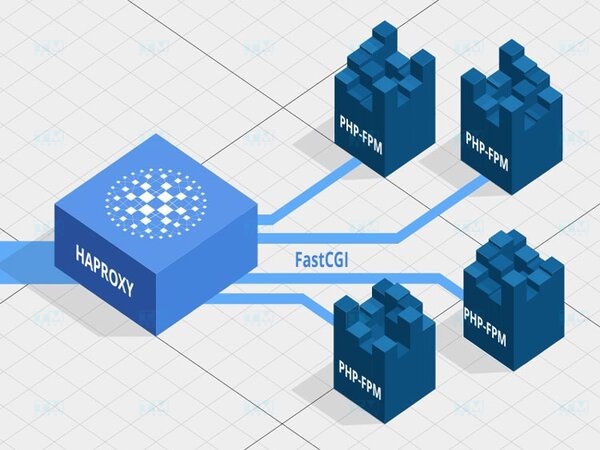
Request processing flow through PHP-FPM:
- User sends an HTTP request to the web server (Nginx/Apache).
- Web server receives the request; if it's a PHP file, forwards it to PHP-FPM via Unix socket or TCP.
- PHP-FPM master process receives the request and distributes it to a worker process in the pool.
- Worker process executes the PHP code, queries the database if needed.
- HTML result is returned to the web server → user's browser.
PHP-FPM supports 3 process management modes:
| Mode | Description | Best For |
|---|---|---|
| static | Fixed number of workers | Dedicated servers, stable traffic |
| dynamic | Workers scale up/down based on demand | Most cases (default) |
| ondemand | Workers created only when requested | Small VPS, low traffic |
PHP Handler Comparison

| Criteria | PHP-CGI | PHP-FPM | DSO (mod_php) |
|---|---|---|---|
| Process Management | New per request | Reusable worker pool | Embedded in Apache |
| Performance | Low | High | Medium |
| Concurrency | Poor | Good | Medium |
| Resources | Wasteful | Optimized | Medium |
| Web Server | Any server | Nginx, Apache, LiteSpeed | Apache only |
| Configuration | Simple | Medium | Simple |
| Security | Basic | Good (per-user pools) | Low (shared user) |
PHP-CGI: Creates a new process per request → slow, resource-heavy. Only suitable for simple environments.
DSO (mod_php): Embeds PHP directly into Apache, easy to install but all scripts run as Apache user → security risk on shared hosting.
PHP-FPM: Maintains worker pool, reuses processes, supports per-user pools → balances performance and security.
Pros and Cons of PHP-FPM

Pros:
- High Performance: Reusable worker pool reduces process initialization overhead.
- Good Concurrency: Handles thousands of concurrent requests with proper pool configuration.
- Flexible Management: 3 process modes (static/dynamic/ondemand), slow-log, status page.
- Security: Separate pools per user/website, per-pool resource limits.
- Wide Compatibility: Nginx, Apache, LiteSpeed, Caddy, and all FastCGI-capable servers.
- Graceful Restart: Configuration reload without service interruption.
Cons:
- More Complex Configuration: Requires understanding of pools, workers, sockets for optimization.
- RAM Usage: Each worker uses 20-50MB RAM; careful calculation needed for small VPS.
- Not Embedded in Apache: Requires separate proxy configuration (mod_proxy_fcgi).
Configuring PHP-FPM with cPanel

cPanel integrates PHP-FPM through EasyApache for easy configuration:
- Log into WHM → EasyApache 4 → Customize.
- In the PHP Extensions tab, select the PHP version to use.
- Go to MultiPHP Manager → select PHP-FPM as PHP Handler.
- Configure per-domain pools in MultiPHP INI Editor.
cPanel automatically creates separate pools for each cPanel user, ensuring resource isolation and security between websites on shared hosting.
Configuring PHP-FPM with Nginx
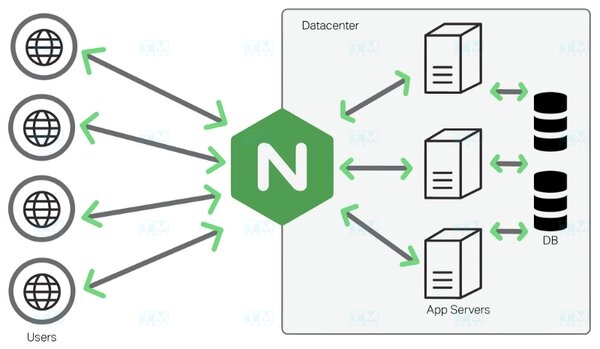
Install PHP-FPM:
# Ubuntu/Debian
sudo apt update
sudo apt install php8.2-fpm

# CentOS/RHEL
sudo dnf install php-fpm
Nginx Configuration:
server {
    listen 80;
    server_name example.com;
    root /var/www/html;
    index index.php index.html;

    location / {
        try_files $uri $uri/ =404;
    }

    location ~ \.php$ {
        include snippets/fastcgi-php.conf;
        fastcgi_pass unix:/var/run/php/php8.2-fpm.sock;
        fastcgi_param SCRIPT_FILENAME $document_root$fastcgi_script_name;
        include fastcgi_params;
    }
}
Test and Restart:
# Test Nginx configuration
sudo nginx -t

# Restart services
sudo systemctl restart nginx
sudo systemctl restart php8.2-fpm

# Check status
sudo systemctl status php8.2-fpm
Conclusion: PHP-FPM is a high-performance PHP process manager that outperforms PHP-CGI and mod_php. With flexible worker pool management, PHP-FPM is the top choice for modern PHP web applications, especially when paired with Nginx.