





An Application Server provides the runtime environment for enterprise applications, acting as an intermediary between clients and databases. This article explains how it works, its components, types, and how it compares to a Web Server.
High-Speed Proxy - Ready to Try?
ALGO Proxy offers residential, datacenter & 4G proxies in 195+ countries
What is an Application Server?
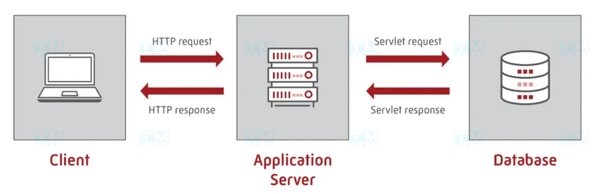
An Application Server is software that provides the runtime environment for enterprise applications. It acts as an intermediary between applications and databases, web services, and external systems.
The concept of Application Servers emerged in the 1990s as enterprise applications grew in complexity. Previously, applications were deployed directly on web servers, making management and scaling difficult. Application Servers solve this by separating business logic from the presentation layer.
How It Works
Request processing flow through an Application Server:
- Client sends an HTTP request to the Web Server (Nginx/Apache).
- Web Server receives the request; if business logic processing is needed, forwards it to the Application Server.
- Application Server analyzes the request and identifies required components.
- Data Access — connects to databases or calls external services (APIs, message queues).
- Business Logic Execution — processes data, validates conditions, performs calculations.
- Returns Result — HTML, JSON, or other data back to Web Server → Client.
Application Servers optimize this flow through connection pooling (reusing DB connections), caching (storing frequently used data), and thread management.
Core Components
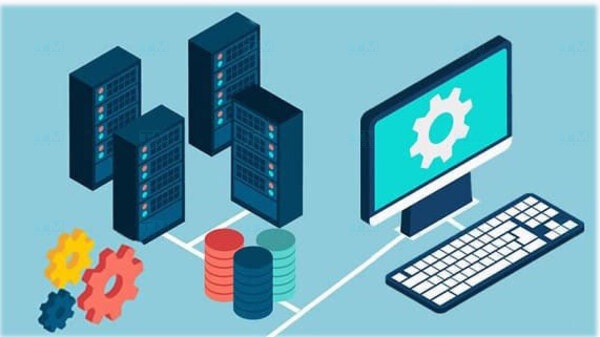
- Container: Runtime environment for applications, manages threads and memory. Examples: Servlet Container (Java), WSGI Container (Python).
- Connection Pool: Manages and reuses database connections, reducing overhead of creating new connections.
- Transaction Manager: Ensures data consistency (ACID) in complex transactions.
- Security Manager: Authentication, authorization, and data encryption.
- Session Manager: Manages user session state.
- Caching Engine: Stores frequently accessed data for faster retrieval.
- Clustering & Load Balancer: Distributes load across multiple instances for high availability.
Key Features
| Feature | Description |
|---|---|
| Thread Management | Automatically distributes and manages threads per request |
| Connection Pooling | Reuses DB connections, reduces latency |
| Transaction Management | Ensures ACID, supports distributed transactions |
| Built-in Security | SSO, LDAP, OAuth, RBAC, SSL/TLS encryption |
| Session Management | Sticky sessions, session replication across nodes |
| Caching | In-memory cache, distributed cache |
| Clustering | Horizontal scaling, automatic failover |
| Monitoring | Health checks, metrics, centralized logging |
| Hot Deployment | Deploy new applications without server restart |
Application Server Types
By Programming Language:
- Java: Tomcat, WildFly (JBoss), WebSphere, WebLogic, GlassFish — Jakarta EE (Java EE) support.
- .NET: IIS + ASP.NET, Kestrel — runs C#, VB.NET applications.
- Python: Gunicorn, uWSGI — runs Django, Flask, FastAPI.
- Node.js: PM2, Express — runs server-side JavaScript.
- PHP: PHP-FPM with Nginx/Apache — runs Laravel, WordPress.
By Architecture:
- Monolithic: All components packaged in a single unit, simple but hard to scale.
- Microservices: Application split into small independent services, flexible and easy to scale.
Benefits
- Faster Development: Developers focus on business logic while the App Server handles infrastructure (connection pooling, threading, security).
- High Performance: Optimizes system resources, handles thousands of concurrent requests.
- Strong Security: Built-in authentication, authorization, and encryption.
- Easy Scaling: Clustering and load balancing allow adding servers as traffic grows.
- Transaction Management: Ensures data consistency in complex systems.
- Cross-platform: Supports multiple operating systems and databases.
- Cost Reduction: Uses ready-made solutions instead of building from scratch.
Popular Application Servers
| App Server | Language | Type | Key Features |
|---|---|---|---|
| Apache Tomcat | Java | Open-source | Lightweight, popular, Servlet/JSP container |
| WildFly (JBoss) | Java | Open-source | Full Jakarta EE, strong clustering |
| IBM WebSphere | Java | Commercial | Enterprise-grade, IBM support |
| Oracle WebLogic | Java | Commercial | High performance, Oracle ecosystem |
| IIS | .NET | Microsoft | Integrated with Windows Server |
| Gunicorn | Python | Open-source | WSGI server for Django/Flask |
| PM2 | Node.js | Open-source | Process manager, zero-downtime reload |
| GlassFish | Java | Open-source | Jakarta EE reference implementation |
App Server vs Web Server
| Criteria | Web Server | Application Server |
|---|---|---|
| Main Function | Serves static content (HTML, CSS, JS) | Executes business logic, dynamic apps |
| Protocols | HTTP/HTTPS | HTTP, RMI, JMS, WebSocket... |
| Content | Static files | Dynamic content |
| Database | Not directly | Connects and manages transactions |
| Transaction Management | No | Yes (ACID, distributed transactions) |
| Examples | Nginx, Apache HTTP, Caddy | Tomcat, WildFly, WebSphere |
| Resources | Lightweight | Heavier |
| Scaling | Reverse proxy, CDN | Clustering, load balancing |
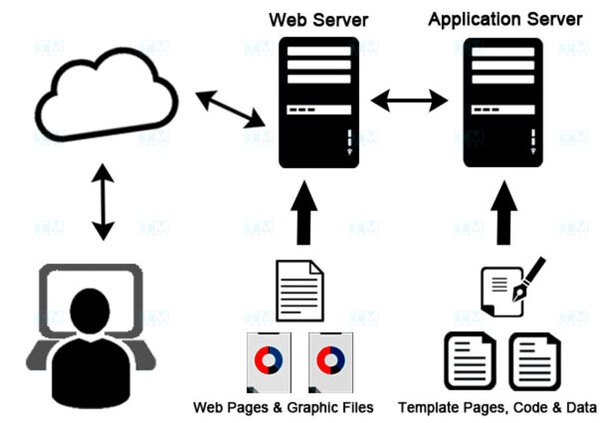
In practice, Web Server and App Server often work together: Nginx (reverse proxy, static files) + Tomcat/Gunicorn (business logic) is a common pattern.
When to Use an Application Server
Use an App Server when:
- Your application has complex business logic (ERP, CRM, e-commerce).
- Transaction management with multiple steps is required.
- You need to handle thousands of concurrent requests.
- Integration with multiple systems (databases, message queues, external APIs) is needed.
- High security requirements (authentication, authorization, encryption).
No App Server needed for:
- Static websites or simple blogs.
- Landing pages, portfolios.
- Serverless applications (AWS Lambda, Cloud Functions).
What is Cloud Server? Comparison with VPS and Dedicated Server
Conclusion: Application Servers are essential for enterprise applications, providing transaction management, security, connection pooling, and clustering. Choosing the right App Server for your programming language and project scale is key to system performance.