






Proxies are essential for managing multiple Facebook accounts and running Ads safely. This article provides a detailed guide on choosing the right proxy, the 14-day account farming process, and how to handle checkpoints.
The Harsh Reality: Facebook is Tightening More Than Ever
High-Speed Proxy - Ready to Try?
ALGO Proxy offers residential, datacenter & 4G proxies in 195+ countries
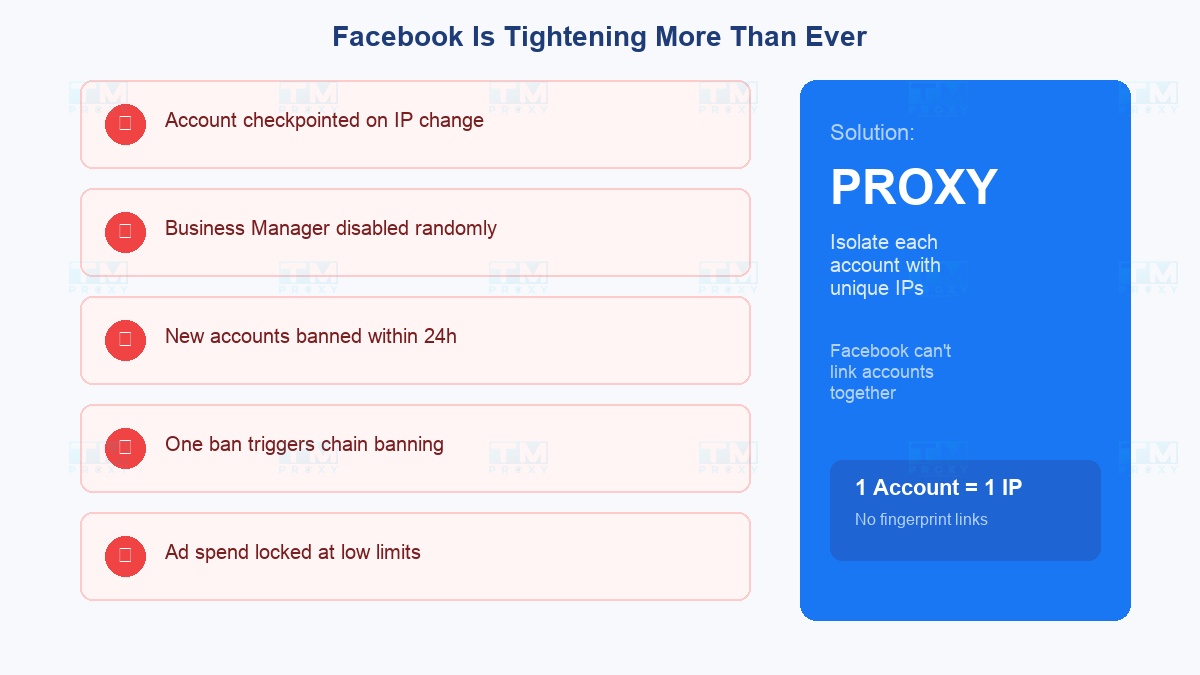
If you're running Facebook Ads or managing multiple accounts, you've surely encountered at least one of these situations:
- Account gets checkpointed the moment you log in from a different IP
- Business Manager gets disabled for no clear reason
- New account gets banned within 24 hours
- One account gets banned → 3-4 other accounts on the same IP follow
- Ad spend limit locked at an unreasonably low level
All of these share 1 common cause: Facebook links accounts through IP address, device fingerprint, and cookies. When one account violates policies, Facebook bans everything connected to it.
Proxies are the only way to isolate each account, making it impossible for Facebook to link them together.
Checklist: What Do You Need Before Starting?
Before buying proxies, make sure you're fully prepared:
| # | What You Need | Details |
|---|---|---|
| 1 | Anti-detect browser | GoLogin, Multilogin, or AdsPower — create a separate profile for each account |
| 2 | Quality proxies | Residential or Mobile — DO NOT use datacenter for Facebook accounts |
| 3 | Unique email/phone | Each account needs an independent email and phone number |
| 4 | Payment cards | If running ads — each BM needs its own card or shared |
| 5 | Profile content | Avatar, cover, bio, a few posts — empty accounts get banned fast |
| 6 | Warm-up plan | Schedule to nurture accounts for 1-2 weeks before running ads |
Residential vs Mobile: Which One for Facebook?
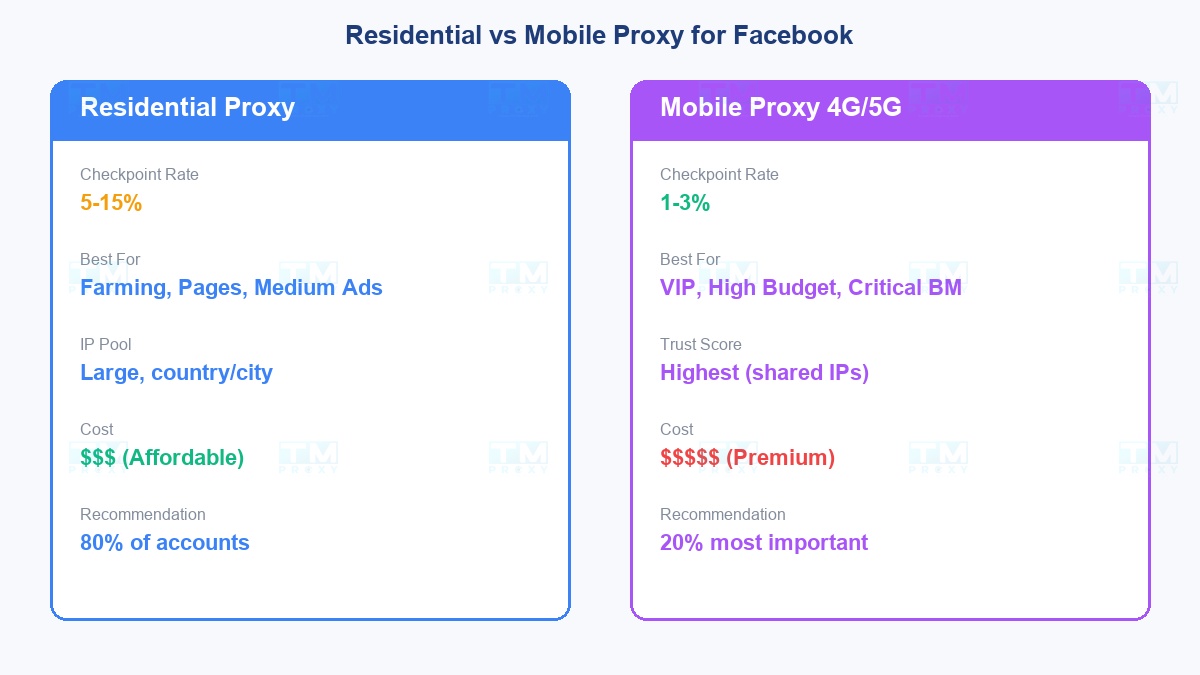
The real race is between Residential and Mobile:
Residential Proxy:
- Checkpoint rate: ~5-15%
- Best for: Account farming, page management, medium-budget ads
- Pros: Reasonable price, country/city IP selection, large IP pool
- Cost: $$$
Mobile Proxy (4G/5G):
- Checkpoint rate: ~1-3%
- Best for: VIP accounts, high-budget ads ($1000+/day), critical Business Managers
- Pros: Highest trust score because Facebook knows mobile IPs are shared by many people
- Cost: $$$$$
| Proxy Type | Checkpoint Rate | 30-Day Survival Rate | Avg Trust Score | Notes |
|---|---|---|---|---|
| Datacenter | 80% | 12% | Low | Not recommended |
| Residential | 10% | 78% | Medium - High | Best value |
| Mobile 4G | 2% | 95% | Very High | Best results, highest cost |
Mobile proxy had the highest survival rate (95%) but costs 3-5x more than residential. Residential proxy offers the best balance between cost and effectiveness.
Practical recommendation: Use residential for 80% of accounts, mobile for the 20% most important ones.
Facebook Account Farming: Detailed 14-Day Process
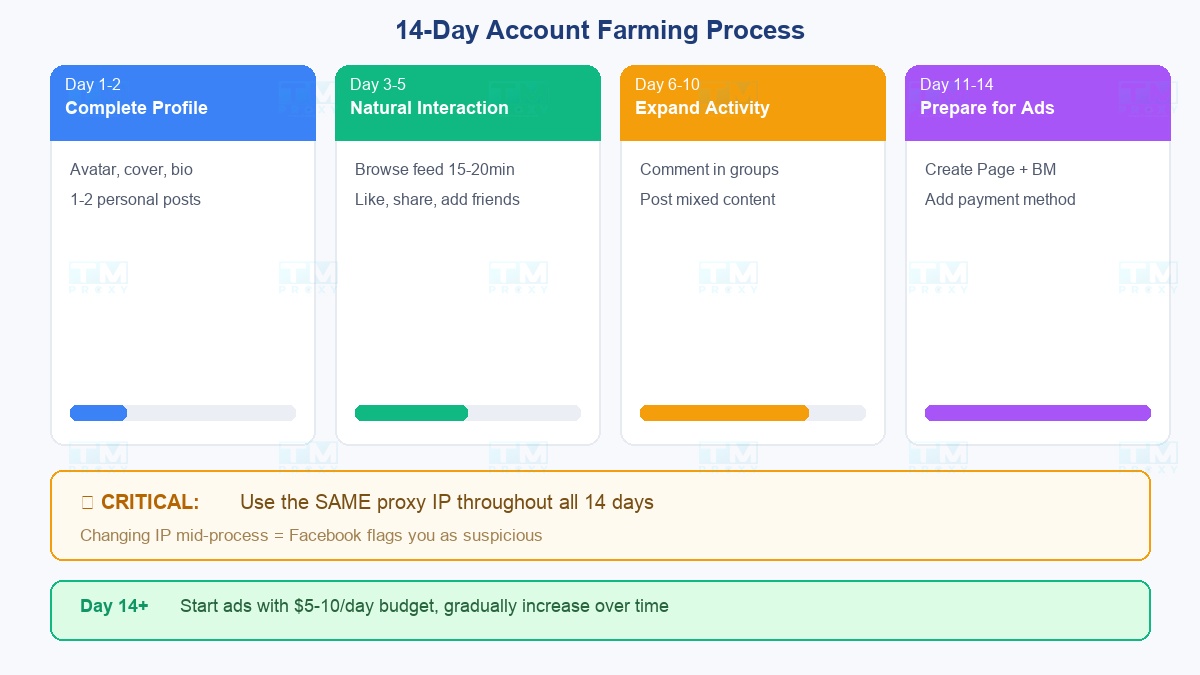
Account farming is the art of making a Facebook account look like a real person. Here's the optimized process:
Days 1-2: Complete the profile
- Upload a real avatar (don't use stock photos)
- Add cover photo, birthday, school, workplace
- Write 1-2 personal posts (share thoughts, landscape photos)
- CRITICAL: Use the same proxy IP throughout all 14 days
Days 3-5: Natural interaction
- Browse News Feed 15-20 minutes/day
- Like 5-10 posts, share 1-2 posts
- Add 3-5 friends/day (choose people in the same region as your proxy IP)
- Join 2-3 relevant groups
Days 6-10: Expand activity
- Comment naturally in groups
- Post more content (mix text, photos, videos)
- Add 5-10 more friends/day
- Message 1-2 new friends
Days 11-14: Prepare for ads
- Create a Fanpage if you don't have one
- Post 1 content piece/day to the Page
- Create Business Manager
- Add payment method
- Day 14+: Start running ads with small budget ($5-10/day), gradually increase
Trust Score: The Life-or-Death Metric for Facebook Proxies
Not all proxies are equal. The "Trust Score" of an IP determines whether your account lives or dies:
High Trust Score (good):
- IP has never been used for spam on Facebook
- Residential IP from a reputable ISP
- Stable IP, doesn't change constantly
- IP region matches account information
Low Trust Score (dangerous):
- IP has been used and banned by multiple other accounts
- Datacenter IP or hosting provider IP
- IP is on Facebook's blacklist
- IP jumps between countries constantly
How to check: Before assigning a proxy to an important account, test by logging in with a test account. If it gets checkpointed immediately → IP has low trust score, switch to another IP.
When Your Account Gets Checkpointed: What to Do?
A checkpoint isn't always "game over." Here's how to handle it:
- Verify with phone/email — If you have a backup phone number, verify immediately. Recovery rate: 90%+
- Upload ID — Facebook requests ID/passport. If the account uses a real name + has activity → recoverable
- Wait 24-48 hours — Some checkpoints auto-resolve after 1-2 days if the account has good history
- DO NOT change IP during checkpoint — Keep the proxy IP unchanged. Changing IP at this point = confirming to Facebook that you're "suspicious"
TMProxy: Your Facebook Marketing Partner
TMProxy is optimized for Facebook with:
- Clean Residential IPs — high trust score, not blacklisted by Facebook
- Mobile Proxy 4G/5G — for VIP accounts and critical Business Managers
- Sticky Sessions up to 24h+ — consistent IP for farming and ads
- Region targeting — choose IPs matching your target market
- Compatible with all popular anti-detect browsers
Conclusion: Facebook marketing is a game of patience and strategy. Proxies help you play this game safely — but good proxies alone aren't enough. Quality proxies + proper farming process + good content = the formula for sustainable success.