






YouTube is the world's largest video platform with 2.5 billion users — but also one with the most regional restrictions. This guide covers using proxies for YouTube: bypassing geo-blocks, managing multiple channels, scraping data, and the best proxy solution from TMProxy.
YouTube + Proxy: Unlocking the World's Largest Video Platform
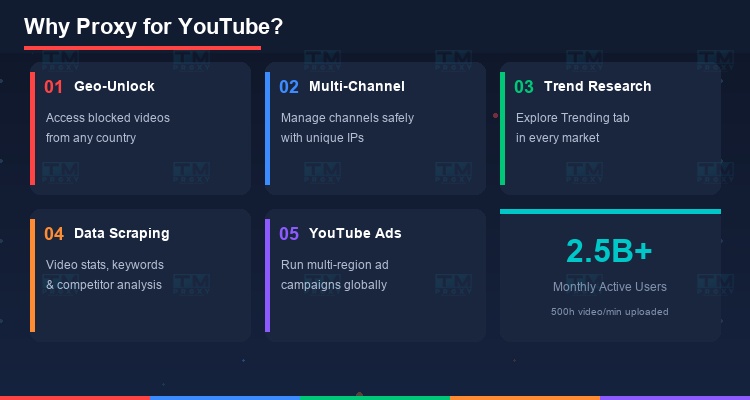
2.5 billion monthly active users. 500 hours of video uploaded every minute. YouTube is an irreplaceable video platform — but also one with the most regional restrictions.
Millions of videos are blocked in specific countries due to copyright, content regulations, or creator policies. YouTube Premium pricing varies 5-10x depending on the country. Search results and recommendations are personalized by location.
What problems do proxies solve?
- Access geo-blocked videos — watch content from any country
- Manage multiple YouTube channels safely from one location
- Research trends by country — Trending tab is completely different in each country
- Scrape YouTube data — video stats, keyword research, competitor analysis
- Run multi-region YouTube Ads — manage ad campaigns across multiple markets
Fast & stable YouTube proxy
TMProxy — residential & mobile proxy for YouTube, from $0.5/GB
Geo-Restrictions: YouTube's Biggest Problem
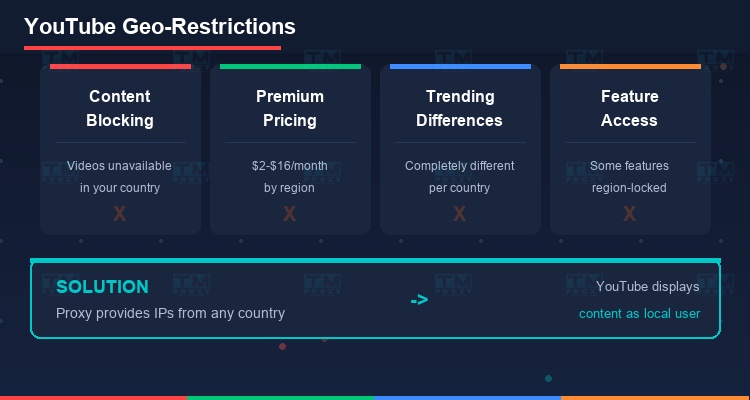
YouTube applies strong geo-restrictions based on IP address:
Common restriction types:
- Content blocking: Video unavailable in your country. Usually due to music copyright, movies, or TV shows.
- YouTube Premium pricing: Prices vary by country — India ~$2/month, US ~$14/month, Switzerland ~$16/month.
- Trending & Recommendations: YouTube Trending page is completely different in each country. Video recommendations depend on IP location.
- Upload restrictions: Some features (Community posts, YouTube Shorts monetization) are only available in certain countries.
Proxies solve all of this by providing IPs from your desired country. Connect via US proxy → YouTube thinks you're in the US → all content and prices display as for US users.
Best Proxy Type for YouTube
YouTube has its own proxy detection system. Choosing the right type matters:
Residential Proxy — Best Overall Choice
Real ISP IPs, YouTube can't distinguish them from regular users. Select IPs by country/city. Suitable for all use cases: watching videos, managing channels, running ads.
Mobile Proxy (4G/5G) — For Channel Management
Highest trust score. Ideal for managing multiple YouTube channels since the YouTube mobile app accounts for 70% of views. Expensive but worth it for important channels.
Datacenter Proxy — Scraping Only
YouTube easily detects datacenter IPs and typically requires CAPTCHA or blocks entirely. Only suitable for API-based data collection with appropriate rate limiting.
YouTube Proxy Setup: Step by Step
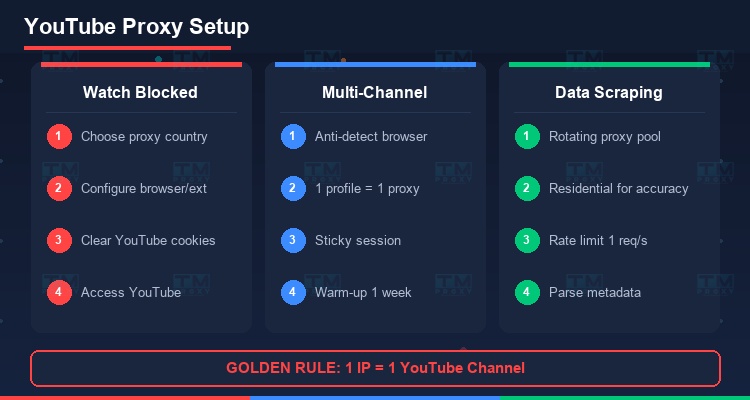
Watching Geo-Blocked Videos
The simplest method: configure proxy in your browser or use an extension.
- Choose a proxy from the country where the video is available
- Configure in browser settings or extension (FoxyProxy, Proxy SwitchyOmega)
- Clear YouTube cookies before connecting via proxy
- Visit YouTube — content displays as in the proxy's country
Managing Multiple YouTube Channels
- Use an anti-detect browser (GoLogin, Multilogin)
- Each channel → 1 browser profile → 1 unique proxy IP
- Golden rule: 1 IP = 1 YouTube channel. No sharing.
- Sticky sessions — keep the same IP for each channel consistently
- Warm-up: 1 week of normal activity (watch, like, comment) before uploading
Scraping YouTube Data
YouTube Data API v3 is the official method but has quota limits. With proxies:
- Rotating proxy for crawling video metadata (title, views, likes, comments)
- Residential proxy for accuracy — datacenter IPs often get rate limited
- Rate limiting: max 1 request/second per IP to avoid bans
Multi-Country YouTube Marketing
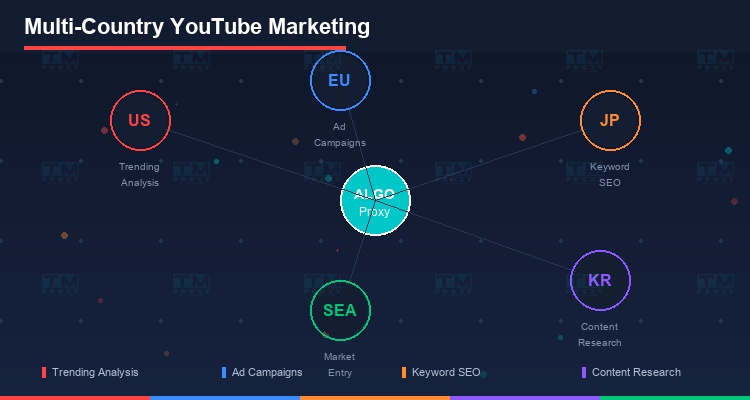
Proxies unlock global YouTube marketing strategies:
Research Trending by country: YouTube Trending in the US is completely different from Trending in Japan. Use proxies to analyze trend formats, topics, and thumbnail styles in each market.
Multilingual Keyword Research: YouTube search suggestions vary by country. Proxies help you see suggested keywords in your target market — critical for video SEO.
Cross-border Competitor Analysis: View competitor channels from a user's perspective in multiple countries. Discover which videos perform best in which markets.
YouTube Ads Management: Manage Google Ads campaigns for YouTube across multiple countries from one location. Each campaign uses a proxy in the target country to verify ad placement.
TMProxy for YouTube
TMProxy is optimized for YouTube:
- Residential Proxy in 100+ countries — bypass all geo-restrictions
- Mobile Proxy 4G/5G — high trust score for channel management
- Sticky Sessions up to 24h — consistent IP for each channel
- Rotating Proxy — optimized for data scraping and keyword research
- High bandwidth — smooth HD video streaming through proxy
| Metric | Datacenter Proxy | ALGO Residential | ALGO Mobile 4G |
|---|---|---|---|
| Access success rate | 42% | 97.5% | 99.2% |
| Avg response time | 3.8s | 1.6s | 1.3s |
| Bypass geo-restriction | Often blocked | Stable | Stable |
| HD video streaming | Unstable | Smooth | Smooth |
| Price/GB | $0.3 | $0.5 | $1.2 |
Result: TMProxy's residential and mobile proxies excel for YouTube with >97% success rate, fast speed, and stable geo-restriction bypass.
Get started at https://vn.tmproxy.com/ — unlock global YouTube today.
Conclusion: YouTube is a borderless video platform — but geo-restrictions create many barriers. Proxies help you overcome every limitation, research global trends, and manage multiple channels safely. Whether you're a creator, marketer, or researcher — proxies are an essential tool for YouTube.