





OwnCloud is an open-source platform that allows users to build their own private cloud storage service on their own server. This article helps you understand ownCloud's features, advantages, uses, and how to install it.
High-Speed Proxy - Ready to Try?
ALGO Proxy offers residential, datacenter & 4G proxies in 195+ countries
What is OwnCloud?

OwnCloud is an open-source platform that allows users to set up and control their own private cloud storage service. With ownCloud, you can create a personal or enterprise Dropbox, where you can store, access, and share files securely and flexibly. Instead of relying on commercial cloud storage services like Google Drive or Dropbox, you can operate your own ownCloud platform on a private server.
This gives you complete control over your data and better security compared to traditional cloud solutions. The platform runs on multiple operating systems including Linux, Windows, macOS, iOS, and Android.
Key features:
- Storage and synchronization: Store all types of data and automatically sync across devices.
- Data sharing: Set up specific access permissions for different user groups.
- Efficient data management: Extension apps for managing calendars, contacts, and many other tasks.
Advantages of ownCloud
Security
When using ownCloud, you have complete control over your data. Data is stored directly on your server, not on a third-party server. OwnCloud supports data encryption, access control, and user permission management, ensuring your information is always protected.
What is Cloud Hosting? Everything You Need to Know About Cloud Hosting
Flexibility
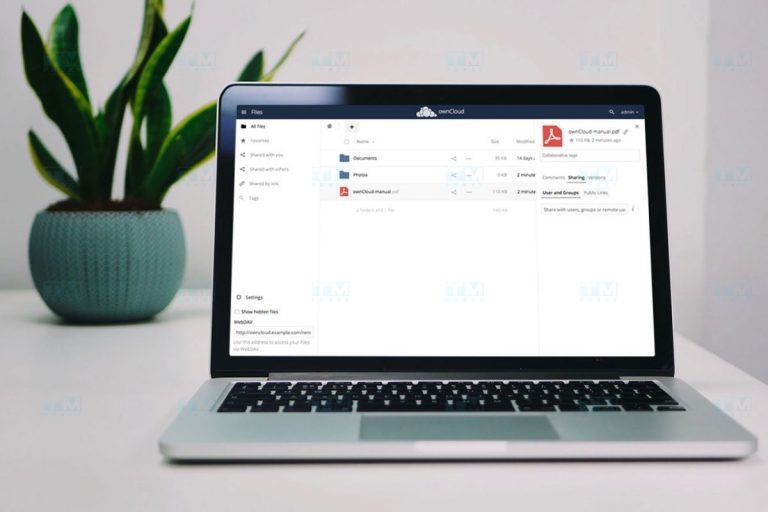
Unlike traditional cloud services, ownCloud provides the ability to customize the interface and install extension apps. You can integrate ownCloud with other software such as CRM and project management tools to optimize your workflow.
Sharing and Collaboration
OwnCloud supports sharing documents with team members, setting different access permissions for each person. Multiple people can collaborate on the same document, optimizing team workflow.
Free and Open-Source
OwnCloud Community Edition is completely free, allowing access to and modification of the source code. This helps reduce storage and data management costs while fostering a strong development community.
Uses of ownCloud
Data Storage and Synchronization
You can store all types of data such as documents, images, and videos without worrying about security. Thanks to the automatic synchronization feature, all updates are made instantly across all devices.
Sharing and Collaboration
OwnCloud provides a secure and efficient platform for sharing. You can set access permissions for individuals or groups, allowing people to work together on files.
Data Recovery
In cases of data loss or corruption, ownCloud allows you to recover important information through its built-in automatic backup system.
Application Integration
OwnCloud can be extended with many additional apps: calendar management, contacts, email, and many other tools, turning it into a comprehensive data management solution.
Notable Features of ownCloud

Access Data Anywhere
You can access your information from any device, as long as you have an internet connection. This is especially useful for people who work remotely or travel frequently.
Single Access Point
OwnCloud creates a single access point for all documents and applications, making it easy to manage and access all resources from one place.
Rotating Proxy Vietnam - Affordable, High Capacity, High Security
Flexible Infrastructure
OwnCloud can be deployed on various hardware and software platforms -- private servers or cloud -- depending on your needs and budget.
Guide to Installing ownCloud on Windows
Installing ownCloud on Windows is quite straightforward with the following steps:
Step 1: Install XAMPP (which includes Apache, MySQL, and PHP). Start Apache and MySQL.
Step 2: Open phpMyAdmin from the XAMPP interface. Create a new database for ownCloud (for example: "owncloud").
Step 3: Download ownCloud from the official website and extract it to the htdocs folder in XAMPP.
Step 4: Access http://localhost/owncloud in your browser. Enter the database name, username, and password to configure.
Step 5: Log in and start using ownCloud.
Conclusion: OwnCloud is an excellent open-source platform for private cloud storage, offering high security, flexible customization, and a completely free Community Edition.