






Firebase is Google's app development platform that provides backend services such as real-time data storage, user authentication, and analytics. This article provides a detailed analysis of Firebase's features, pros and cons, and a guide on how to use it.
High-Speed Proxy - Ready to Try?
ALGO Proxy offers residential, datacenter & 4G proxies in 195+ countries
What is Firebase?
Firebase is a cloud-based platform for app development that offers a wide range of products and tools developers can use to build and scale their applications. Launched in 2011 and later acquired by Google in 2014, Firebase has become one of the most popular tools for mobile and web app developers.
Firebase is more than just a database system; it encompasses many different services such as storage, user authentication, data analytics, and much more. This makes it easy for developers to access and integrate complex features into their applications without having to write excessive amounts of code.

Benefits of Firebase
One of the biggest benefits of Firebase is the ability to save developers time. Firebase's services allow developers to focus on building and designing user experiences rather than worrying about the backend. Furthermore, Firebase offers excellent scalability, allowing applications to grow without encountering performance issues.
This is advantageous not only for individual developers but also for large development teams, where rapid and efficient development time can mean reduced costs and improved product quality.
Firebase's Flexibility
Firebase also stands out for its flexibility, offering solutions suitable for both mobile and web applications. Whether you are developing a gaming app, an e-commerce app, or any other type of application, Firebase can meet your needs. With easy integration with other tools and services, Firebase becomes an ideal choice for modern developers.
Overview of Firebase Product/Service Groups
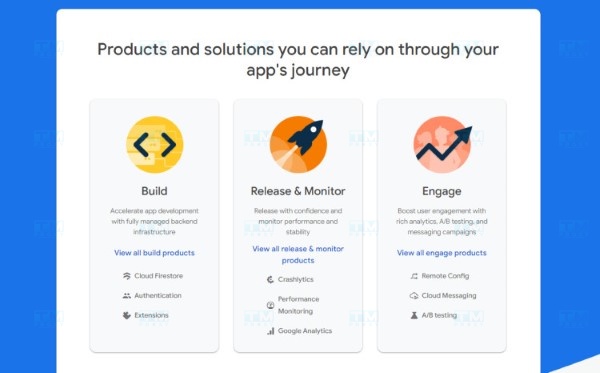
Firebase provides a wide range of products and services divided into several specific groups. Each group has its own unique tools and functionalities, designed to serve the diverse needs of developers.
App Development Tools
Firebase's app development tools include services such as Firestore, Realtime Database, Cloud Functions, and Hosting. These tools help developers build the backend for their applications without having to develop everything from scratch.
Firestore and Realtime Database allow you to store and synchronize data in real time, facilitating the development of interactive applications. Cloud Functions lets you run server-side code without managing physical servers, reducing the workload for developers.
Analytics and App Optimization Tools
This group includes Firebase Analytics and A/B Testing, helping developers track user behavior and optimize their experience. Firebase Analytics provides detailed information about how users interact with your app, helping developers make smarter decisions in product development.
A/B Testing allows you to test different versions of your app to see which one is more effective at retaining users or increasing revenue. This is extremely important during product development, where improving user experience can lead to the success or failure of an application.
User Management and Marketing Services
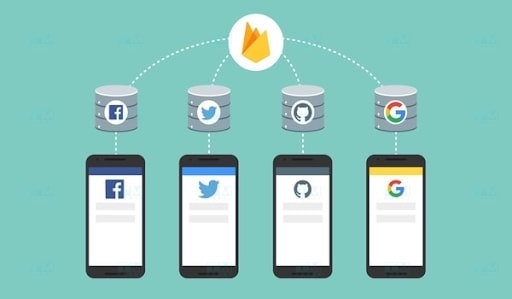
Firebase also offers services such as Firebase Authentication and Firebase Cloud Messaging for user management and sending notifications. Firebase Authentication allows you to authenticate users through multiple methods such as email, phone number, or social media accounts.
Meanwhile, Firebase Cloud Messaging enables you to send push notifications to your app, enhancing user engagement and driving more effective marketing campaigns.
Key Features of Firebase
Firebase doesn't just stop at providing basic services; it also has many powerful features that help developers build applications efficiently.
Real-Time Data Storage and Synchronization
One of Firebase's standout features is the ability to store and synchronize data in real time. With Realtime Database and Firestore, any data changes are instantly updated across all devices without needing to refresh the page or reload the app.
This creates a seamless and interactive user experience, which is crucial for applications that require collaboration features or continuous updates, such as chat apps or social networks.
Easy Integration with Development Platforms
Firebase supports multiple development platforms, including Android, iOS, and Web. This means you can use Firebase for any application you are developing without needing to learn many additional technologies.
This easy integration helps developers save time and effort, allowing them to focus on developing unique features for their applications.
User Behavior Analytics Support
Firebase Analytics provides deep insights into how users interact with your app. You can track specific events, user retention rates, or even analyze user acquisition sources.
Understanding user behavior not only helps you improve the user experience but also allows you to optimize marketing campaigns, thereby increasing revenue for your application.
Marketing Strategy Management and Optimization Tools
Firebase provides many useful tools for managing and optimizing marketing campaigns. With Firebase Cloud Messaging, you can send push notifications to users, enhancing engagement and customer retention.
Additionally, A/B Testing and Firebase Predictions tools help you test and predict user behavior, enabling more accurate marketing decisions.
Advantages of Firebase
Firebase has many notable advantages that make it a top choice for many developers.
Easy to Use
One of Firebase's greatest advantages is its user-friendly interface and ease of use. Even beginners can quickly become familiar with the platform and start developing applications without difficulty.
The intuitive management console along with detailed documentation makes it easy for developers to learn and apply Firebase's features to their projects.
Powerful Integration
Firebase allows integration with many external services and APIs, expanding app capabilities. By combining Firebase with services like Google Analytics, Google Ads, or Crashlytics, you can easily monitor and improve your app's performance.
This flexibility allows developers to customize their applications the way they want, creating unique and impressive user experiences.
Scalability
One of Firebase's standout advantages is scalability. As your app grows and the number of users increases, Firebase can automatically adjust to meet demand without disrupting the user experience.
This is particularly important for high-traffic applications such as e-commerce apps or social networks, where maintaining stable performance is crucial.
Disadvantages of Firebase
Despite its many advantages, Firebase also has some drawbacks that developers should consider before deciding to use it.

Cost
Although Firebase offers a free plan for beginners, as your app grows and traffic increases, service costs will rise accordingly. This can become a limiting factor for small businesses or developers testing new ideas.
Additionally, if you don't manage the resources your app uses effectively, costs can spike unexpectedly.
Customization Limitations
While Firebase is very flexible, there are some limitations regarding customization. Depending on a service provider like Firebase can create barriers when developing unique features you want to integrate into your application.
If you need complex customizations, you may have to weigh the trade-off between using Firebase and developing a completely separate backend solution.
Technical Support
Although Firebase provides a large community and rich documentation, finding technical support can sometimes be quite challenging. If you encounter errors or complex issues, you may spend more time finding a solution compared to using another service with faster customer support.
Guide to Using Firebase
Using Firebase is straightforward and can be broken down into a few basic steps. Below is a step-by-step guide to help you get started with Firebase.

Create a Firebase Account
To use Firebase, you need a Google account. Once you have an account, visit the Firebase website and sign in. From there, you can create a new project.
When you create a project, Firebase will automatically set up the environment for you, including services you can use for your project such as Firestore, Realtime Database, Authentication, and more.
Connect Your App to Firebase
After creating a project, you will receive a configuration code that needs to be integrated into your application. For web apps, you simply add a JavaScript snippet to your project. For mobile apps, you will need to use the Firebase SDK corresponding to the platform you are developing on.
Now you are ready to use Firebase services in your application.
Add Features to Your App
After connecting your app to Firebase, you can start adding features such as data storage, user authentication, and push notifications. Each service has detailed documentation on the Firebase website, making it easy to learn how to integrate them into your application.
Remember to regularly check for new features that Firebase releases, as the platform is constantly updated and improved to better serve developers.
What Types of Apps Should Use Firebase?
Firebase is truly an ideal platform for many different types of applications. Below are some typical examples.

Chat Applications
With Firebase's real-time data storage and synchronization capabilities, chat applications can leverage it to update messages instantly without needing to refresh the page. This creates a smooth and engaging user experience that users always expect from chat apps.
Social Networking Apps
Social networking apps can also benefit from Firebase. With the ability to store large amounts of data and manage users efficiently, Firebase helps developers create powerful interactive features such as comments, user following, or post sharing.
E-Commerce Applications
E-commerce apps can use Firebase to manage product databases, shopping carts, and track user behavior. Firebase Analytics will help you analyze users' shopping behavior, thereby optimizing the shopping experience and increasing revenue.
{{< test-result title="So sanh cac nen tang Backend-as-a-Service" headers="Tieu chi|Firebase|Supabase|AWS Amplify|Appwrite" row1="Nha phat trien|Google|Supabase Inc|Amazon|Ma nguon mo" row2="Co so du lieu|NoSQL (Firestore)|PostgreSQL|DynamoDB|MariaDB" row3="Realtime|Co|Co|Co|Co" row4="Goi mien phi|Spark (gioi han)|Co|Free tier|Tu host mien phi" row5="Phu hop|App mobile, web|App can SQL|He sinh thai AWS|Tu chu backend" />}}
Conclusion: Firebase is Google's app development platform with a comprehensive suite of tools ranging from real-time data storage, user authentication to behavior analytics and push notifications. Its standout advantages include ease of use, powerful integration, and excellent scalability. However, be mindful of rising costs with high traffic and customization limitations when depending on the platform.