





HeidiSQL is a free, open-source database management tool that supports MySQL, MariaDB, PostgreSQL, and MS SQL Server. This article guides you through installation, connection, SQL execution, data backup, and comparison with phpMyAdmin, DBeaver, and MySQL Workbench.
High-Speed Proxy - Ready to Try?
ALGO Proxy offers residential, datacenter & 4G proxies in 195+ countries
What is HeidiSQL?
What is HeidiSQL? HeidiSQL is a free, open-source database management tool developed by Ansgar in 2002 that runs on the Windows operating system. This tool allows users to connect to and manage various types of databases, including MySQL, MariaDB, PostgreSQL, MS SQL Server, InterBase, Firebird, and SQLite.
HeidiSQL not only allows viewing and editing data as well as database structures, but also includes built-in help for the SQL language. Users can connect to multiple local and remote database servers while using command-line parameters. With multi-language support and a sustainable development history, HeidiSQL has become one of the most popular tools in database administration, being maintained and improved regularly.
Key Features of HeidiSQL
What are the key features of HeidiSQL? HeidiSQL is not just a simple database management tool; it also integrates many powerful features that help optimize the user's workflow. Below are some notable features you can explore.
Database Management and Connection
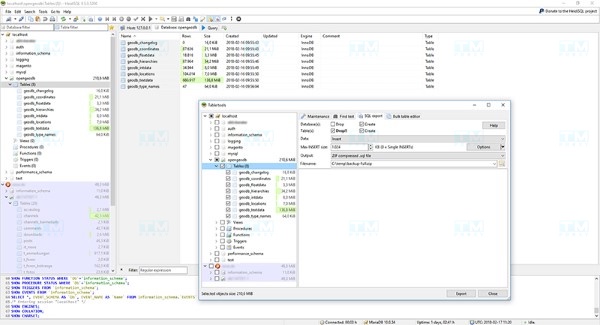
HeidiSQL allows users to connect to a wide variety of database servers such as MySQL, MariaDB, PostgreSQL, Microsoft SQL Server, InterBase, and Firebird. This provides flexibility for users working on different projects. In particular, the intuitive connection interface makes setting up connections very simple; users only need to enter the IP address, username, and password to get started.
Managing databases in HeidiSQL is also extremely easy. You can create, edit, or delete databases with just a few clicks. This management approach helps save time and increase work efficiency, especially for those working with multiple databases simultaneously.
Executing SQL Statements
With the built-in SQL editor, HeidiSQL allows users to execute SQL statements quickly and conveniently. The interface supports syntax highlighting, syntax suggestions, and query history storage, making it easy for users to track and reuse previous statements.
This not only saves time but also minimizes syntax errors, a common issue when working with complex SQL statements. Using HeidiSQL to execute queries provides better performance compared to working through the command line.
Editing Tables and Data
Editing table structures and data in databases becomes easier than ever when using HeidiSQL. Users can create, delete, and edit tables with just a few clicks. In particular, you can easily define columns, primary keys, foreign keys, and other table attributes.
The intuitive interface allows users to view and edit data directly in the table, making data import and export extremely convenient. HeidiSQL also supports popular data formats such as CSV, XML, and JSON, allowing users to convert and manage data easily.
Database Backup and Recovery
The ability to back up and recover data is a critical factor in database management. With HeidiSQL, users can create backups of the entire database or just specific tables, and restore them when needed. This ensures that data is always safe and can be recovered in case of loss or corruption.
The backup and recovery process is fast and easy, helping users save time and effort. This is extremely important for production environments, where data loss can have serious consequences.
User and Access Management
HeidiSQL also provides user management and access control features, allowing system administrators to control who has access to the database. You can create, edit, and delete user accounts, as well as grant permissions to each account. This feature plays an important role in ensuring data security, protecting sensitive information from unauthorized access.
Each user account can be granted different access permissions for objects such as tables, views, stored procedures, etc., ensuring that only authorized users can perform sensitive operations in the database.
Multi-Platform Support
HeidiSQL not only supports Windows but can also run on Linux and macOS through Wine. This expands the user base for this tool and accommodates the needs of various developers and system administrators. The diversity in supported platforms makes it easy for users to access and fully utilize HeidiSQL's features.
Applications of HeidiSQL
What are the applications of HeidiSQL? HeidiSQL is not just for database administrators; it can be applied in many different fields such as web development, enterprise data management, and supporting learning and research.
Use in Web Development
In the field of web development, HeidiSQL becomes an indispensable tool for programmers and engineers. With the ability to manage MySQL and MariaDB databases, developers can easily create and edit databases to meet the needs of web applications.
Additionally, executing complex SQL statements and editing data visually saves time, allowing developers to focus on feature development without worrying about managing databases through the command line.
Enterprise Data Management
In the enterprise environment, where data management is crucial, HeidiSQL provides an effective solution. Businesses can use this tool to manage customer information, products, and services, thereby making strategic decisions based on data.
Furthermore, with data backup and recovery support, organizations can rest assured about the safety of their information. This is an essential factor for maintaining stable operations and sustainable growth for businesses.
Supporting Learning and Research
HeidiSQL is also used by many students and researchers for academic and research projects. With its user-friendly and easy-to-use interface, students can easily work with databases to conduct experiments and data analysis.
What is IIS? Advantages, Installation, and Detailed IIS Server Configuration
Additionally, the ability to execute SQL statements and back up data helps users manage data scientifically and efficiently. This not only saves time but also enhances database management skills for learners.
How to Use HeidiSQL to Connect to a MySQL Database
Before proceeding with the steps to connect to a MySQL database using HeidiSQL, you need to prepare the following:
- HeidiSQL client software
- IP address of the Remote MySQL entry
- MySQL database login credentials
- Ensure that you have installed HeidiSQL on your computer. Below are the steps to connect:
Step 1: Allow remote connection to the MySQL database from your IP address
First, you need to determine your public IP address. Then, navigate to the Remote MySQL section in your web hosting control panel.
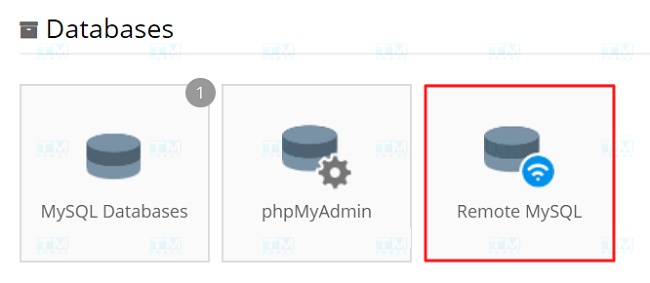
In the Remote MySQL section of the control panel, add your public IP address to allow remote connections. Don't forget to save the remote MySQL hostname information for later use.
After adding, click the Create button and you will receive a confirmation notification.

Step 2: Gather MySQL database information
After successfully assigning your IP address to the MySQL database, you need to gather the database login information. This information can be found in the MySQL Databases section of the control panel. In Step 1, you already obtained the remote MySQL hostname information; now, get the database name and username to prepare for configuration in HeidiSQL in the next step.
Step 3: Configure the HeidiSQL client
Open HeidiSQL and click the New button to create a new entry. Next, name this entry and enter the MySQL database information.
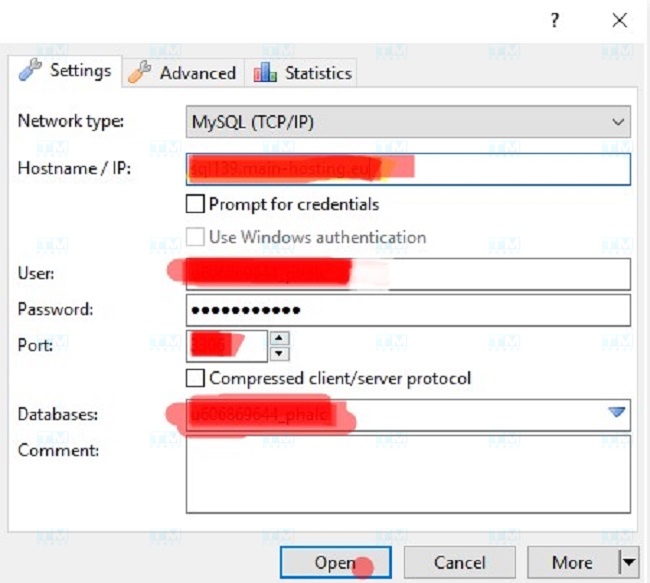
Comparing HeidiSQL with Other Tools
In the current database management tool market, many different applications compete with HeidiSQL. To help you choose the right tool, let's compare HeidiSQL with some other popular tools.
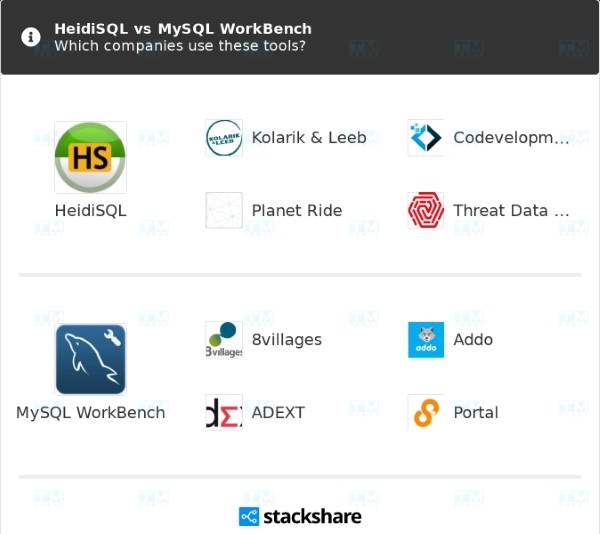
HeidiSQL vs MySQL Workbench
MySQL Workbench is a product by Oracle, designed to provide a more comprehensive database management interface. However, HeidiSQL still stands out with its intuitive and easier-to-use interface. MySQL Workbench may require users to have deeper database knowledge to fully leverage its features.
- User Interface: HeidiSQL has a simple and easy-to-use interface, well-suited for beginners. In contrast, MySQL Workbench offers a richer graphical interface with many visual tools for database design and management.
- Connection Capability: HeidiSQL supports direct SSH connections to MySQL or MariaDB servers, while MySQL Workbench also allows similar connections but requires more complex configuration.
- Functionality: MySQL Workbench comes with advanced features such as data modeling and ER diagram design, while HeidiSQL primarily focuses on basic management functions and SQL execution.
HeidiSQL vs phpMyAdmin
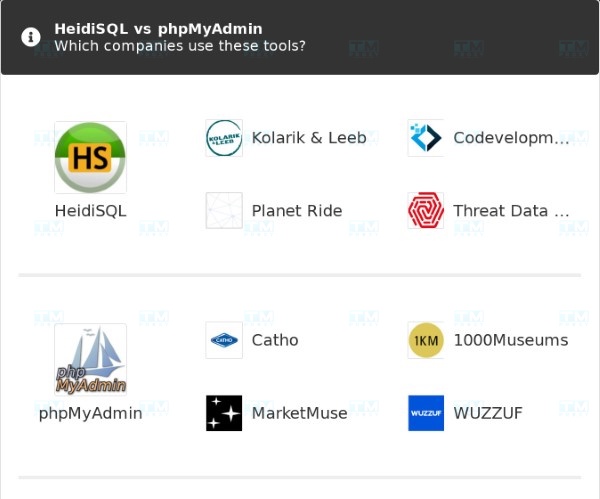
Both HeidiSQL and phpMyAdmin are open-source tools for managing MySQL and MariaDB databases. However, HeidiSQL stands out with its user-friendly graphical interface and ease of use. phpMyAdmin typically requires users to work through a web browser, while HeidiSQL provides a standalone application with more features.
- Operating Environment: HeidiSQL is an application installed on the Windows operating system, while phpMyAdmin is a web application that allows users to manage databases from any browser.
- Performance: HeidiSQL has higher performance when processing large datasets, as it doesn't depend on the browser and isn't limited by web resources. Conversely, phpMyAdmin may run slower due to the nature of web applications.
- Features: phpMyAdmin provides basic features suitable for web administrators' needs, but HeidiSQL supports more advanced features, such as user management and direct database import/export capabilities.
HeidiSQL vs DBeaver
DBeaver is an open-source database management tool that supports many different database management systems. Although DBeaver is powerful and feature-rich, its interface is somewhat more complex compared to HeidiSQL.
- Cross-Platform: HeidiSQL only supports the Windows operating system, while DBeaver is a cross-platform tool compatible with Windows, macOS, and Linux.
- Extensibility: DBeaver supports many different database management systems such as Oracle, SQLite, and MongoDB, while HeidiSQL primarily focuses on systems like MySQL, MariaDB, MS SQL, and PostgreSQL.
- Interface: DBeaver has a rich user interface with many features such as connecting to multiple servers and the ability to browse and edit data through tables. Meanwhile, HeidiSQL primarily focuses on basic functions with a simple and easy-to-use interface.
If you're looking for an easy-to-use tool with an intuitive interface, HeidiSQL will certainly provide a better experience. However, if you need to manage many different types of databases, DBeaver may be a more suitable choice.
Common Errors When Using HeidiSQL
During the use of HeidiSQL, you may encounter some errors. Below are three common errors along with how to fix each one:
Cannot Connect to MySQL Server
This error is usually caused by incorrect MySQL connection port configuration. To fix it, check the port in HeidiSQL's configuration. On most hosting services, the default connection port is 3306. You can contact your hosting provider to confirm the exact port you need to use.
Invalid MySQL Hostname
This error occurs when you enter the wrong MySQL server hostname. To fix this error, carefully check the hostname information. If you use Hostinger, you can find this information in the Remote MySQL section of the hosting control panel.
Access Denied for User
This error can occur for many reasons, including incorrect login credentials or a missing IP address in the Remote MySQL section. If you encounter this error, try the following steps:
Check whether the MySQL username and password are correct. Confirm whether the IP address of the connecting computer is allowed to access the MySQL server. If you still cannot resolve the issue, contact your hosting provider for further assistance.
{{< test-result title="Database Management Tool Comparison" headers="Criteria|HeidiSQL|phpMyAdmin|DBeaver|MySQL Workbench" row1="Type|Desktop (Windows)|Web-based|Cross-platform Desktop|Cross-platform Desktop" row2="Price|Free (GPL)|Free (GPL)|Free / Pro|Free (GPLv2)" row3="Supported DBs|MySQL, MariaDB, PostgreSQL, MSSQL, SQLite|MySQL, MariaDB|Most DBs (50+)|MySQL" row4="Interface|Simple, intuitive|Web browser|Complex, versatile|Rich graphics" row5="ER Modeling|No|No|Yes|Yes" row6="Large Data Performance|Good|Average|Good|Good" />}}
Conclusion: HeidiSQL is a free, open-source database management tool suitable for both beginners and experts. With an intuitive interface supporting MySQL, MariaDB, PostgreSQL, MSSQL, and SQLite, HeidiSQL helps manage tables, execute SQL, and back up data efficiently.