






Alias is an alternative name for an object in information technology, ranging from variables in programming to domain names on the web. This article explains the concept of Alias Domain in detail, how it works, its benefits, and provides configuration guides for cPanel, Directadmin, and Plesk.
High-Speed Proxy - Ready to Try?
ALGO Proxy offers residential, datacenter & 4G proxies in 195+ countries
Overview of Alias
To get a better overview of aliases, we first need to clearly define what they are and their practical applications.
What is an Alias?

What is an alias? The word "alias" means another name, a nickname, or a pseudonym. In information technology, an alias is commonly used to refer to an alternative name or label for a specific object. For example, in programming, you can create an alias for a variable or function to make the source code shorter and easier to understand. From a networking perspective, an alias can refer to a virtual IP address that allows a device to access multiple services simultaneously.
Using aliases is not just about making work easier — it also provides higher security for users. You can use an alias to keep your real identity hidden on forums or social media platforms. In practice, aliases are becoming a useful tool for optimizing workflows.
What is an Alias Domain? Examples of Alias Domains

An alias domain is a type of domain name that you can use to point to an existing website. This means that when users type the alias domain into their browser, they will be redirected to the original website you have specified. This is an effective method for managing multiple domain names without having to build separate websites.
For example, you might own the primary domain example.com and want to create an additional domain example.net by setting up example.net as an alias domain for example.com. When someone visits example.net, they will automatically be redirected to example.com. This not only strengthens brand recognition but also simplifies management.
How Aliases Work
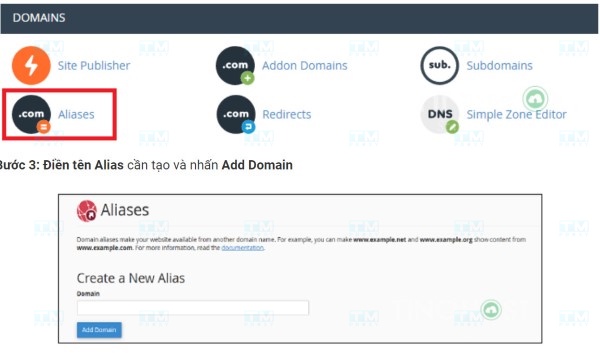
When an alias domain is configured, it works very similarly to the primary domain but does not require content duplication. This saves both cost and time for website administrators.
In simple terms, when an alias domain is activated, it maps to the IP address of the original domain. This means all user requests are routed to the primary domain's server. As a result, the content is displayed identically for both domains, even though the user entered the alias domain.
What is an IP Address? Advantages, Disadvantages, and How It Works
Additionally, managing alias domains is very straightforward. You can make changes to the primary domain and everything will automatically update for the alias domain without any extra steps. This is why many businesses choose to use alias domains as part of their marketing and branding strategy.
When Should You Use an Alias?
Using an alias domain is not always appropriate; however, there are certain situations where you should consider applying it. Below are some typical scenarios.

Using Multiple Domain Addresses for a Single Website
One of the most common reasons to use an alias domain is to manage multiple domain addresses for the same website. This helps strengthen your online presence and supports advertising campaigns.
For instance, if you own an online store selling health products, you could purchase multiple domains related to your products — such as suckhoe.com, skincare.com, or thucphamchucnang.com — then set them all as aliases for your official web address. This way, you can attract different customer segments without spending too much effort on management.
Using a Single Email Account with Multiple Domain Extensions
One of the major benefits of using alias domains is the ability to use a single email account with multiple domain extensions. This can be very useful in a business environment.
For example, you could use an email account like contact@company.com and then configure aliases for other domains such as info@company.net or support@company.org. When customers send emails to any of these addresses, all messages will be forwarded to the primary email account. This helps you manage all customer contacts more easily.
Creating Multiple Landing Pages for Different Marketing Campaigns
In marketing, creating multiple landing pages for different campaigns is very important. Using alias domains allows you to do this flexibly.
Suppose you are running an advertising campaign for a new product — you could create an alias domain like productlaunch.company.com. This way, you can easily track and analyze the performance of each campaign without having to rebuild the website for every campaign.
Creating Multiple Website Versions for Different Regions
If you run an international business, having multiple website versions for different regions is essential. Alias domains help you accomplish this without difficulty.
You could own a primary domain like yourbusiness.com, then create alias domains such as yourbusiness.fr for France or yourbusiness.de for Germany. Each alias can lead to a language version or content appropriate for the corresponding geographic region. This helps you serve customers better and increase sales opportunities.
Benefits of Domain Aliases
Using alias domains brings many benefits to businesses. Below are some key highlights.

Strengthening Brand Recognition
One of the greatest benefits of using alias domains is the ability to strengthen brand recognition. With multiple domains related to your brand, you can attract more customers and enhance your brand value.
The memorability of web addresses also makes it easier for customers to find and return to you. This is especially important in today's competitive environment, where capturing customer attention is very difficult.
Easier Advertising
Using alias domains makes advertising easier. Instead of running multiple promotional campaigns for each individual web address, you only need to focus on one primary domain and use aliases for specific campaigns.
This not only saves time but also reduces advertising costs. With additional alias domains, you can run A/B tests to see which address delivers the best results without having to create a new website from scratch.
Cost Savings
Using alias domains also helps you save significant costs. Instead of paying for multiple domains and different hosting plans, you only need one primary domain and use aliases for other addresses.
This is very beneficial for small businesses or startups in their early stages when budgets are limited. You can still expand your online presence without worrying too much about costs.
Comparing Domain, SubDomain, Addon Domain, and Alias/Parked Domain
When it comes to domain names, there are many different concepts you need to understand to make the right decisions. Below are some common domain types.
Domain
A domain, or domain name, is the main address that users type into their browser to access a website. It consists of two basic parts: the name and the extension (such as .com, .net, .org). It is the address you register, own, and use to build your brand.
SubDomain
A subdomain is a part of the main domain. It is commonly used to separate different sections of a website. For example, blog.example.com is a subdomain of example.com. Subdomains allow you to organize content more effectively.
Addon Domain
An addon domain is a completely independent domain that is hosted on the same hosting account as the primary domain. This means you can have one or more addon domains without purchasing additional hosting. Addon domains are commonly used for different projects or websites.
Alias/Parked Domain
An alias domain, also known as a parked domain, is a domain name that points to another web address without needing to reinstall content. It acts as a protective layer for the primary domain and can help you control traffic without creating multiple separate websites.
The differences between these domain types are important so you can choose the most suitable solution for your needs.
Guide to Using Alias Domains
Using alias domains is not complicated, but specific steps are needed to ensure proper setup. Below is a step-by-step guide for using alias domains.
How to Configure Alias Domains on cPanel
cPanel is one of the most popular website management tools. Configuring alias domains on cPanel is also very simple and straightforward.
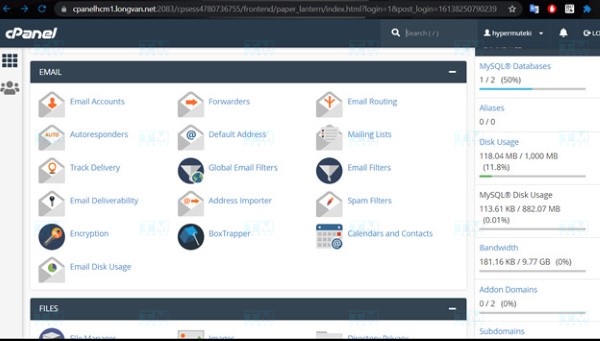
Creating an Alias Domain on cPanel First, log in to your cPanel account. Then, find the "Alias" or "Parked Domains" section. Here, you will see an option to add a new alias domain.
Enter the domain name you want to add in the text field and click the "Add Domain" button. Once the process is complete, your alias domain will be added and will point to the main website.
Editing an Alias Domain on cPanel If you need to edit information related to an alias domain, you can easily do this on cPanel. Simply navigate to the list of aliases you have created, then click the "Edit" option. You can change the domain name or other settings as needed.
Searching for an Alias Domain on cPanel If you have many alias domains and want to find a specific address, you can use the search function on cPanel. Type the domain name you are looking for in the search box and the system will quickly filter the corresponding results.
Deleting an Alias Domain on cPanel To delete an alias domain you no longer use, go to the alias list on cPanel. Find the domain name to delete and click the "Delete" button. Confirm your action and the alias domain will be removed from your account.
How to Configure Alias Domains on Directadmin
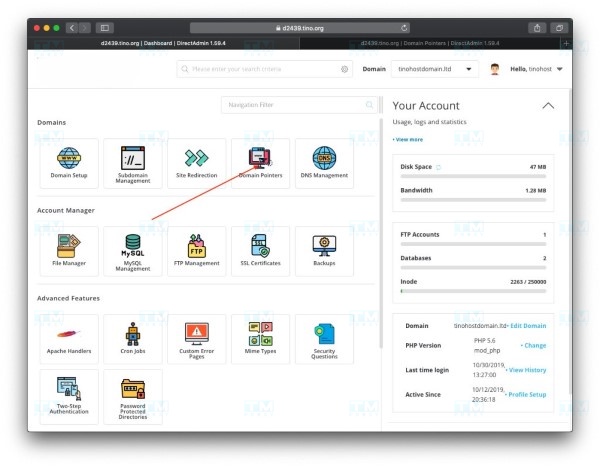
Direct Admin is also a popular hosting management tool used by many people. The process of configuring alias domains on Directadmin is relatively easy.
Creating an Alias Domain on Direct Admin After logging into your Directadmin account, navigate to the "Domain Setup" section. Here, you will see the "Create Alias Domain" option. Enter the domain name you want to add and click "Create".
Editing an Alias Domain on Direct Admin To edit an alias domain, simply go to the "Domain Setup" section, select the alias you want to edit, and click "Edit". Here, you can change the related information.
What is Shopee Proxy? A Guide to Choosing the Right Proxy for Shopee
Deleting an Alias Domain on Direct Admin When you no longer need a particular alias domain, go back to the "Domain Setup" section. Find the alias you want to delete and click "Delete". The system will confirm and remove that alias.
How to Configure Alias Domains on Plesk
Plesk is another highly popular hosting management platform. Configuring alias domains on Plesk is also quite simple and convenient.
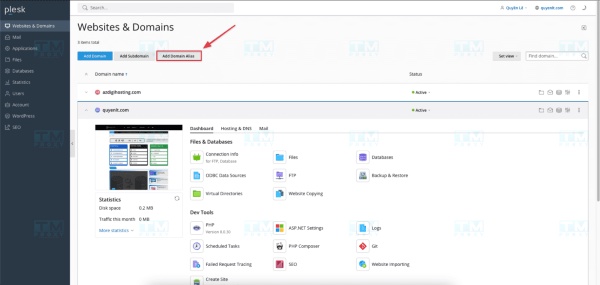
Creating an Alias Domain on Plesk
Log in to Plesk and navigate to the "Websites & Domains" section. Here, you will see the "Add New Alias" option. Enter the domain name you want to add and click the "OK" button.
Editing an Alias Domain on Plesk
To edit alias domain information, simply go back to the "Websites & Domains" section, find the alias you want to modify, and select "Edit". You can easily change the information here.
Deleting an Alias Domain on Plesk
When you want to delete an alias domain on Plesk, search in the alias list, then select the alias to delete and click "Remove". The system will ask you to confirm before performing the deletion.
Important Notes When Using Aliases

Although using alias domains brings many benefits, you should also keep several considerations in mind to optimize usage.
Name aliases carefully and clearly: Alias names should clearly reflect their function or purpose to avoid confusion.
Avoid using too many aliases: Using too many aliases can make code or systems difficult to understand and maintain.
Ensure aliases are not duplicated: Aliases should be named so they do not conflict with other aliases in the same context.
Test aliases thoroughly before use: Before using an alias, you should test it thoroughly to ensure it works as expected.
Use aliases responsibly: Aliases can be used for anonymity or to protect personal information, but they can also be exploited for malicious purposes. Therefore, use aliases responsibly and with caution.
Frequently Asked Questions About Aliases
Below are some frequently asked questions related to alias domains that users commonly have.

Should you use Alias Domains or Parked Domains when you already have subdomains and addon domains?
The answer depends on your specific needs. If you only need a different domain name to point to the same content, an alias domain is the better choice. On the other hand, if you want to manage multiple separate websites, addon domains or subdomains may be more suitable.
Why are there two terms — Parked Domain and Alias Domain — for the same concept?
In practice, these two terms are often used interchangeably, but sometimes Parked Domain refers to reserving a domain without using it, while Alias Domain can include pointing to more specific content. However, both serve the purpose of helping you manage multiple domain names more easily.
Should you use multiple Alias Domains?
Using multiple alias domains can bring many benefits, but you also need to be careful to avoid creating confusion. If your alias domains are all related to a single brand or common theme, then this is perfectly acceptable. Conversely, without a clear plan, it can be confusing for users.
{{< test-result title="So sanh cac loai ten mien" headers="Tieu chi|Domain|SubDomain|Addon Domain|Alias Domain" row1="Noi dung|Doc lap|Phan cua domain chinh|Doc lap|Giong domain chinh" row2="Hosting|Rieng|Chung voi domain chinh|Chung hosting|Chung hosting" row3="Chi phi|Cao|Mien phi|Them phi ten mien|Them phi ten mien" row4="Quan ly|Doc lap|Don gian|Phuc tap hon|Don gian" row5="SEO|Tot nhat|Tot|Doc lap|Khong anh huong" />}}
Conclusion: Alias is an alternative name that simplifies management in IT. Alias Domains allow you to point multiple domain names to the same website, strengthen brand recognition, and save costs. Configuration on cPanel, Directadmin, or Plesk is straightforward and quick.