






A Security Proxy helps hide your IP address, protect your identity, and enhance privacy while browsing the web. This article explains how it works, its benefits, common types, and important considerations when using one.
What is a Security Proxy?
High-Speed Proxy - Ready to Try?
ALGO Proxy offers residential, datacenter & 4G proxies in 195+ countries
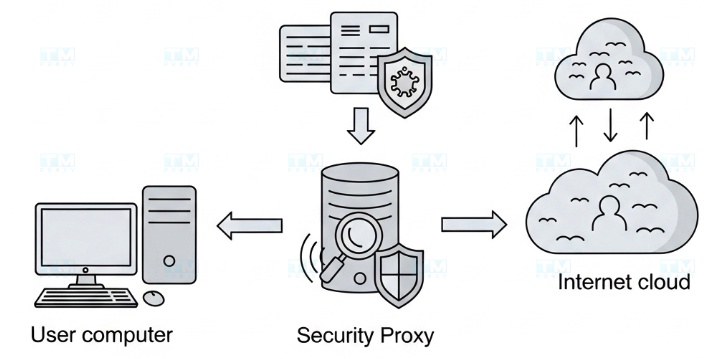
Essentially, a Security Proxy acts as an intermediary — an invisible "bodyguard" between you and the internet. When you visit a website, instead of connecting directly, your request is first sent to the proxy server. The proxy server then sends that request to the website on your behalf. All data from the website is also sent to the proxy server before being forwarded to you.
This process helps conceal your real IP address, which can be compared to your home address on the internet. Instead, the website only sees the IP address of the proxy server.
How a Security Proxy Works
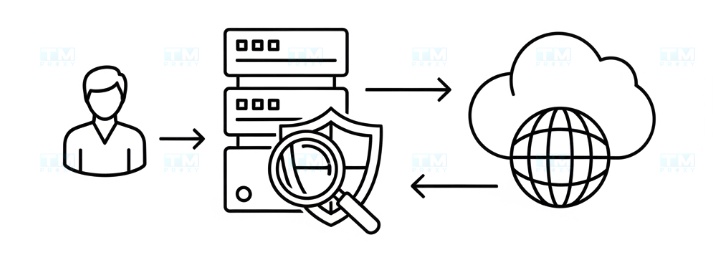
Imagine you want to send a letter without the recipient knowing your real address. You could send the letter to a friend and ask them to forward it to the recipient. In this case, your friend acts as a proxy server.
Similarly, when you use a proxy:
- You send a request: You enter a web address in your browser. This request goes to the proxy server.
- The proxy processes the request: The proxy server receives your request and sends it to the web server of the site you want to visit on your behalf.
- Receiving the response: The web server sends data (web page content) back to the proxy server.
- Forwarded to you: The proxy server forwards this data to your device.
Thanks to this mechanism, your real identity and location are kept hidden, enhancing your privacy and security.
Benefits of a Security Proxy
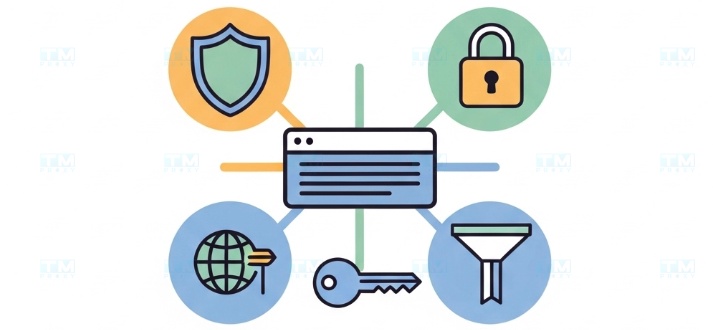
Using a security proxy offers many practical benefits:
- Enhanced privacy: This is the biggest benefit. By hiding your IP address, a proxy allows you to browse the web anonymously, limiting tracking by advertisers and third parties.
- Improved security: A proxy acts as a shield, helping prevent direct cyberattacks on your device. Some proxies can also filter malicious content, viruses, and spyware.
- Access to restricted content: A proxy allows you to bypass geographic restrictions. For example, you can access websites or services only available in a specific country by using a proxy server located in that country.
- Internet access control: In corporate or household environments, proxies can be used to block access to unwanted websites, improving work efficiency and protecting children from inappropriate content.
Common Types of Security Proxies
There are many different types of proxies, each serving specific needs. Here are some common ones:
- Anonymous Proxy: Hides your IP address but still lets the website know you are using a proxy.
- Elite Proxy (High Anonymity Proxy): This is the most secure type of proxy — it not only hides your IP but also conceals the fact that you are using a proxy.
- Transparent Proxy: Commonly used in public networks (such as schools and companies) to filter content without users being aware. This type does not hide your IP address.
- Residential Proxy: Uses IP addresses provided by ISPs to residential users. This type of proxy has high reliability and is harder to detect.
- Datacenter Proxy: Created from data centers, offering fast speeds but easier for websites to detect compared to residential proxies.
| Proxy Type | Anonymity | Speed | Detection Difficulty | Cost |
|---|---|---|---|---|
| Elite Proxy | Very High | Medium | Very High | $$$$ |
| Residential Proxy | High | Medium | High | $$$ |
| Anonymous Proxy | Medium | Fast | Medium | $$ |
| Datacenter Proxy | Medium | Very Fast | Low | $ |
| Transparent Proxy | None | Very Fast | Not Applicable | Free |
Residential Proxy and Elite Proxy are the best choices for security. Datacenter Proxy is suitable when speed is prioritized over anonymity.
Important Considerations When Using a Proxy
To ensure safety and effectiveness when using a proxy, keep the following points in mind:
- Stay away from free proxies: "You get what you pay for." Free proxies are often unreliable, slow, and carry many security risks. Some free proxy providers may even track and sell your data.
-
Choose a reputable provider: Select paid proxy providers with a good reputation, clear privacy policies, and positive community reviews.
-
Understand your own needs: Determine the purpose of your proxy use (anonymous web browsing, bypassing firewalls, or for work) to choose the appropriate type of proxy.
-
A proxy is not a cure-all solution: Although a proxy enhances security, it does not fully encrypt your traffic like a VPN (Virtual Private Network). For the highest level of security, consider using both in combination.
Conclusion: A Security Proxy is a useful tool for protecting your identity and personal data while browsing the web. By understanding how it works and choosing the right type of proxy from a reputable provider like TMProxy, you can browse the internet with greater peace of mind.