






Checking proxy and firewall settings is an essential skill for ensuring network security. This article walks you through how to check proxy and firewall settings on Windows, key benefits of using a proxy, security considerations, and how to troubleshoot common errors.
High-Speed Proxy - Ready to Try?
ALGO Proxy offers residential, datacenter & 4G proxies in 195+ countries
Overview of Proxy
A proxy is a tool that replaces the user's real IP address with its own. When a user visits a website, instead of the request going directly to the website, it passes through the proxy. The proxy sends the request to the website on behalf of the user and then returns the response. This process helps protect the user's real IP address while reducing the risk of exposing personal information.
There are several types of proxies, each serving a different purpose. Here are the most common ones:
- Transparent Proxy: Does not hide the user's real IP address and is typically used to control internet access within internal networks.
- Anonymous Proxy: Hides the user's IP address but does not encrypt data. This type is commonly used to protect online privacy.
- SSL/HTTPS Proxy: Not only hides the IP address but also encrypts data, providing a higher level of security. This is especially important when users need to protect sensitive information online.
What is Firebase? Features, Pros and Cons, and How to Use It
Although proxies offer many benefits for protecting personal information, they are not a comprehensive security solution on their own. To ensure safety, users should combine proxies with other security measures such as antivirus software and VPNs. Additionally, when choosing a proxy service, prioritize reputable providers, as many free services may collect users' personal data.
How to Check Proxy and Firewall Settings
To make sure your proxy and firewall are functioning properly, you need to follow a few simple steps. Below is a detailed guide on how to check proxy and firewall settings.
Step 1: Open Windows Settings To check your proxy and firewall, first open the Control Panel by pressing the Windows + X key combination, then select Control Panel from the list. In the Control Panel, navigate to System and Security, then select Windows Defender Firewall.
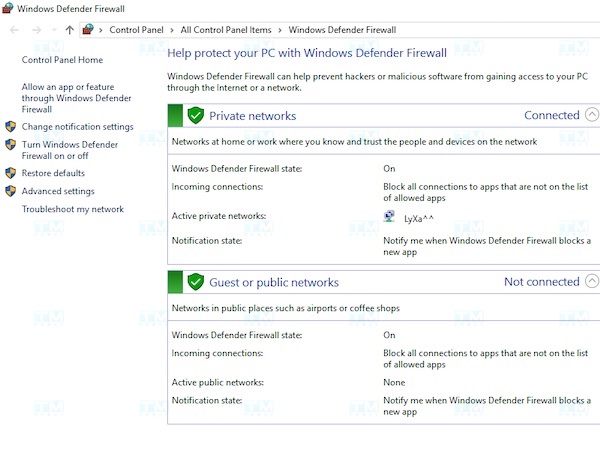
Step 2: Complete the Check In the left-hand menu, click Turn Windows Defender Firewall on or off. Here you will see the option Turn off Windows Defender Firewall (not recommended) for both Private network settings and Public network settings. Check these boxes and then click OK to apply and save the changes.
Key Benefits of Proxy
Security and Privacy
Proxy plays a vital role in protecting user privacy by hiding the real IP address. This prevents websites and services from collecting information about the user's location and identity, safeguarding privacy and ensuring safe browsing.
Access Control and Management
Proxy helps network administrators control internet access by blocking inappropriate or unsafe websites. This creates a safe browsing environment that complies with the organization's security policies.
Caching and Performance Optimization
Proxy can store content from previously visited websites, reducing load times when users revisit them. Using cache not only optimizes performance but also improves the user experience with faster browsing speeds.
Accessing Geo-Restricted Content
Proxy allows users to access services or content restricted by region. By changing the IP address, a proxy creates a virtual location in another country or region, helping users bypass geographic barriers.
Server Load Balancing
Proxy can reduce the burden on the main server by distributing requests to other servers, improving performance and ensuring service stability during periods of high traffic.
Software Development and Testing
During software development and testing, proxies help developers simulate and test various network conditions. This ensures that the software runs reliably and efficiently across diverse network environments.
Important Notes When Checking Proxy and Firewall
When checking proxy and firewall settings, there are several important points to keep in mind:
- Perform regular checks: You should check your proxy and firewall settings periodically to ensure they are running stably and effectively.
- Update software and security rules: Make sure to keep all related software and security rules up to date. Updates not only add new features but also patch security vulnerabilities, enhancing protection against network threats.
- Seek technical support: If you encounter issues with your proxy or firewall, contact your network service provider or network administrator for timely assistance.

Following these guidelines will help you maintain a safe and efficient network environment.
Frequently Asked Questions About Checking Proxy and Firewall
Below are some frequently asked questions related to checking proxy and firewall settings:
What does the error "Proxy server cannot be found" mean when accessing a website?
This error message indicates that the proxy you are using does not exist or is not functioning. Check your proxy settings to make sure you are using the correct proxy information.
What does the error "Firewall is blocking this connection" mean when accessing a website?
This error message indicates that your firewall is blocking the connection to that website. Check your firewall settings to make sure the website is not being blocked.
Can a firewall prevent proxy checks?
Yes, it can. A firewall may block proxy checks if it is not configured correctly. Therefore, before performing any proxy checks, make sure your firewall is not blocking connections to proxy-checking websites.
{{< test-result title="So sanh cac loai Proxy" headers="Tieu chi|Transparent Proxy|Anonymous Proxy|HTTPS Proxy" row1="An IP|Khong|Co|Co" row2="Ma hoa du lieu|Khong|Khong|Co" row3="Bao mat|Thap|Trung binh|Cao" row4="Toc do|Nhanh|Trung binh|Cham hon" row5="Ung dung|Kiem soat mang noi bo|Bao ve quyen rieng tu|Bao ve du lieu nhay cam" />}}
Conclusion: Checking proxy and firewall settings is an essential skill for ensuring network security. Proxies protect privacy and optimize performance, while firewalls block unauthorized access. Regular checks and frequent updates help maintain a safe network environment.