





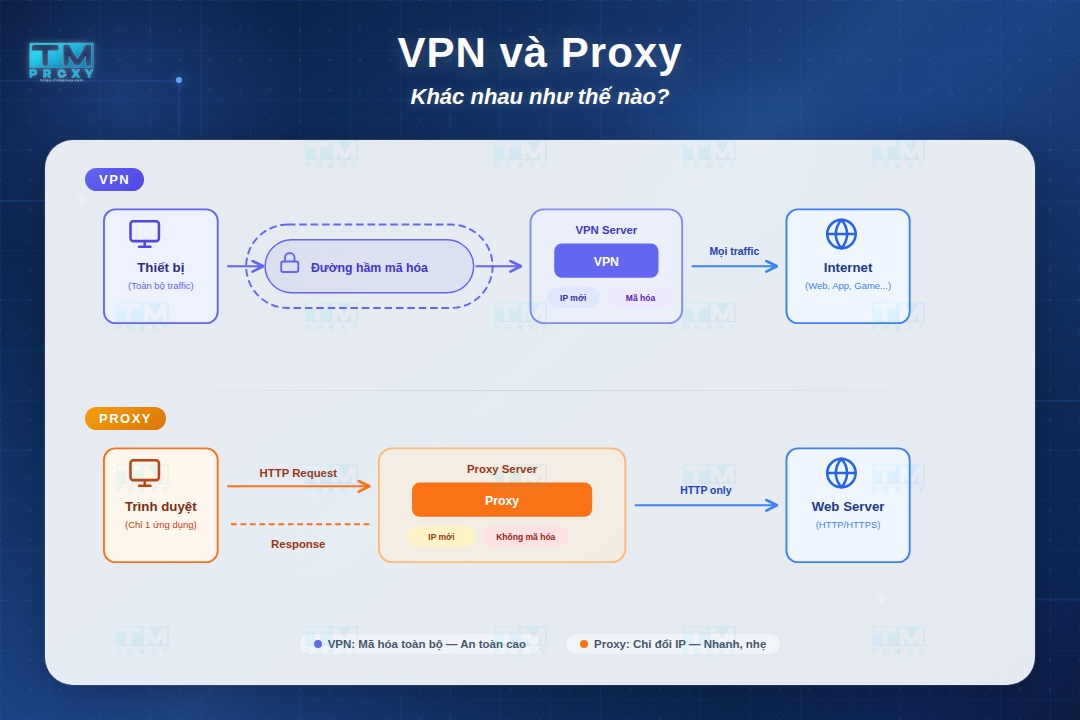
VPN and Proxy are both tools that help protect online privacy and change IP addresses, but they work in fundamentally different ways. This article provides a detailed comparison of how they work, security levels, speed, cost, and the best use cases for each.
What is a Proxy?
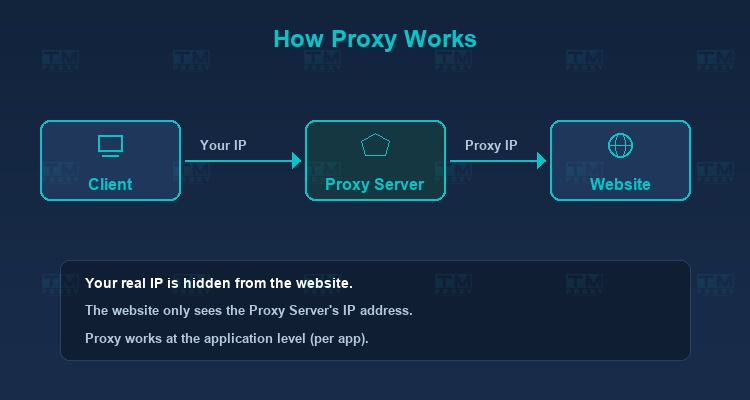
A proxy (or proxy server) is an intermediary server that sits between your device and the internet. When you send a request to access a website, the request first goes through the proxy server, which then forwards it to the target website on your behalf. The target website only sees the proxy's IP address, not your real one.
High-Speed Proxy - Ready to Try?
ALGO Proxy offers residential, datacenter & 4G proxies in 195+ countries
Common Types of Proxies
-
HTTP Proxy: Operates at the application layer, handling only HTTP/HTTPS traffic. Best suited for web browsing and data collection.
-
SOCKS5 Proxy: Operates at a lower level, supporting multiple protocols including TCP and UDP. More versatile than HTTP proxies, ideal for streaming, gaming, and torrenting.
-
Transparent Proxy: Does not hide the user's IP. Commonly used in corporate environments for monitoring and content filtering.
-
Residential Proxy: Uses real IP addresses from Internet Service Providers (ISPs), making them harder to detect and block. This is the most preferred type for tasks requiring high reliability.
How a Proxy Works
- The user configures a proxy in their browser or application.
- The access request is sent to the proxy server.
- The proxy forwards the request to the target website.
- The website responds back to the proxy.
- The proxy forwards the response to the user.
An important point to note is that proxies typically operate at the application level — meaning only traffic from the configured application goes through the proxy, while other applications on the same device connect directly to the internet.
What is a VPN?
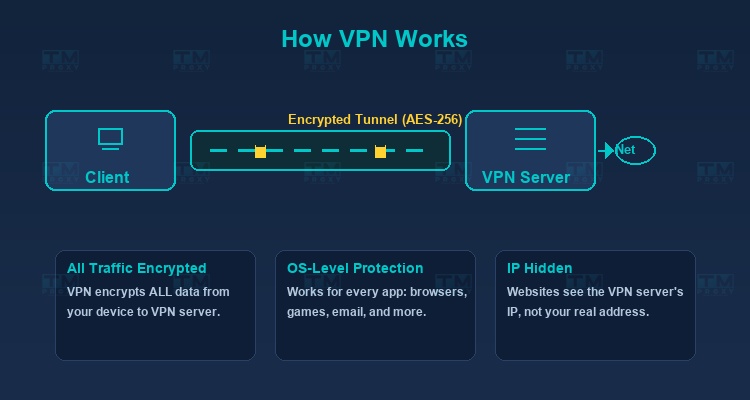
A VPN (Virtual Private Network) is a technology that creates an encrypted "tunnel" between your device and a VPN server. All internet traffic from your device is encrypted and routed through this tunnel before reaching the open internet.
Common VPN Protocols
-
OpenVPN: An open-source protocol highly regarded for its security. Supports both TCP and UDP, offering flexibility across various network environments.
-
WireGuard: A newer protocol that is significantly lighter and faster than OpenVPN. Its compact codebase makes it easier to audit for security.
-
IKEv2/IPSec: Ideal for mobile devices thanks to its ability to automatically reconnect when switching networks (e.g., from Wi-Fi to cellular).
-
L2TP/IPSec: An older protocol still in use but slower compared to modern alternatives.
How a VPN Works
- VPN software on the device encrypts all internet traffic.
- The encrypted data is sent through a secure tunnel to the VPN server.
- The VPN server decrypts the data and forwards the request to the internet.
- Responses from the internet are re-encrypted and sent back to the user's device.
Unlike proxies, VPNs operate at the operating system level, encrypting all traffic from every application on the device.
Detailed Comparison: VPN vs Proxy
Data Encryption
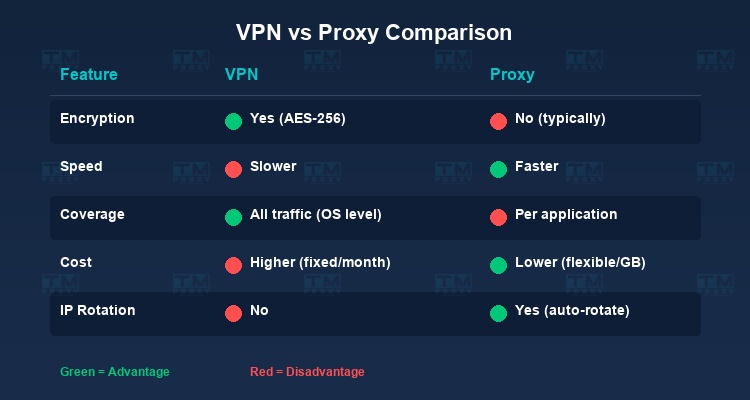
VPN encrypts all traffic using strong algorithms like AES-256, ensuring data cannot be read even if intercepted in transit.
Proxy typically does not encrypt data (except HTTPS proxies). Data transmitted between you and the proxy can be monitored if the connection doesn't use SSL/TLS.
Scope of Protection
VPN protects all network traffic at the OS level — every app, browser, game, and email client is covered.
Proxy only protects traffic from the specifically configured application. For example, if you only configure a proxy for Chrome, traffic from Firefox or other apps won't go through the proxy.
Speed
Proxy is generally faster because there's no encryption/decryption overhead. Datacenter proxies in particular can achieve very high speeds thanks to powerful server infrastructure.
VPN can be slower due to the encryption/decryption process, but modern protocols like WireGuard have significantly reduced this gap.
Anonymity
Proxy hides your IP from the target website, but the proxy provider can see your traffic. Residential proxies offer a higher level of anonymity than datacenter proxies.
VPN provides a higher level of anonymity thanks to encryption. Reputable VPN providers typically commit to a "no-log" policy.
Cost
Proxy comes in a wide range of pricing, from free to paid. Residential proxies are usually charged by bandwidth (GB), allowing flexible costs based on usage.
VPN typically charges a fixed monthly/yearly subscription with unlimited bandwidth.
Comparison Summary
| Criteria | VPN | Proxy |
|---|---|---|
| Encryption | Yes (AES-256) | No (typically) |
| Scope | Entire system | Per application |
| Speed | Medium - High | High - Very High |
| Anonymity | High | Medium - High |
| IP Rotation | No | Yes (rotating proxy) |
| Scraping-friendly | No | Very suitable |
| Setup | Requires software | Simple configuration |
| Cost | Fixed/month | Flexible per GB |
When Should You Use a VPN?
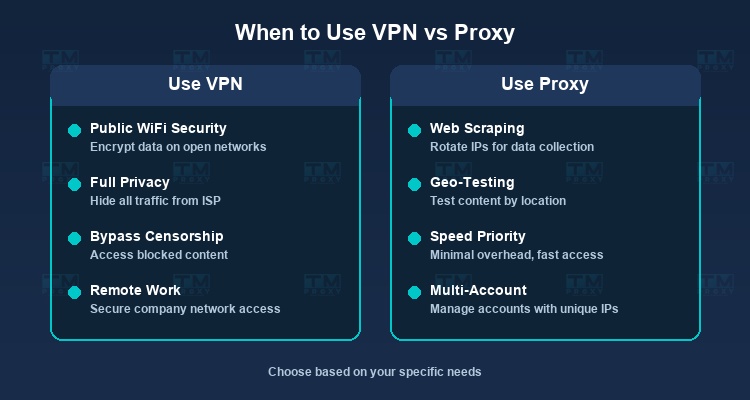
A VPN is the right choice when:
-
Security on public Wi-Fi: When using Wi-Fi at a café, airport, or hotel, a VPN encrypts your data to prevent hackers from stealing information.
-
Accessing restricted content: Watching movies, listening to music, or accessing services that are blocked by geographic region.
-
Protecting personal privacy: Preventing your ISP from tracking your online activities.
-
Remote work: Securely accessing your company's internal network from outside.
When Should You Use a Proxy?
A proxy is the optimal choice when:
-
Web scraping: Proxies allow you to send multiple requests from different IPs, avoiding website blocks. This is the most common use case for proxies.
-
Managing multiple accounts: Using different IPs for each account on e-commerce platforms and social media.
-
SEO and market research: Checking keyword rankings and ads from different geographic locations.
-
Ad verification: Verifying that ads are displayed correctly in target regions.
-
Automation: Bots and automation tools that need to rotate IPs continuously for stable operation.
Can You Combine VPN and Proxy?
Absolutely. Some advanced users combine both VPN and Proxy for enhanced security and flexibility:
-
VPN + Proxy: Connect to a VPN first to encrypt all traffic, then use a proxy in the browser to rotate IPs for specific tasks.
-
Proxy chain: Use multiple proxies in sequence to increase anonymity levels.
However, keep in mind that combining them may reduce connection speed since data has to pass through more intermediaries.
Choosing a Reliable Proxy Service
If you need high-quality proxies for your work, TMProxy is a solid choice offering:
- Over 10 million residential IPs from 200+ countries.
- Support for HTTP, HTTPS, and SOCKS5.
- Automatic IP rotation or sticky sessions.
- Competitive pricing suitable for projects of any scale.
- 24/7 technical support.
Performance Benchmarks — Speed Comparison
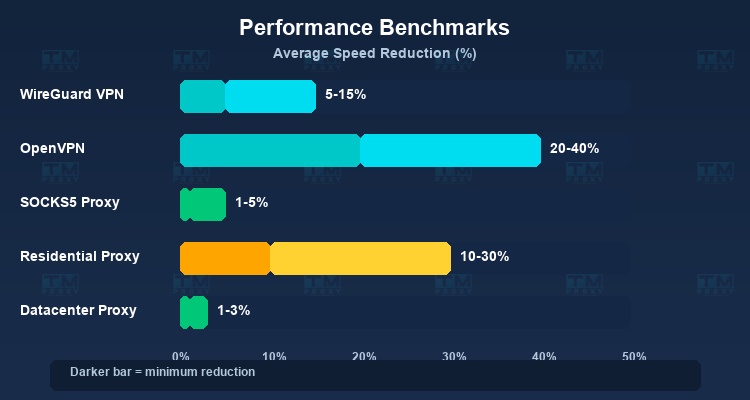
A common question is how VPN and Proxy affect internet speed. Here are real-world benchmarks based on multiple independent tests:
| Technology | Average Speed Reduction | Added Latency | Notes |
|---|---|---|---|
| WireGuard VPN | 5-15% | 5-10ms | Fastest protocol currently available |
| OpenVPN (UDP) | 20-40% | 15-30ms | Most popular, high security |
| OpenVPN (TCP) | 30-50% | 20-40ms | More stable than UDP but slower |
| SOCKS5 Proxy | 1-5% | 1-5ms | Almost no speed impact |
| Residential Proxy | 10-30% | 20-80ms | Depends on IP quality |
| Datacenter Proxy | 1-3% | 1-10ms | Fastest among proxy types |
WireGuard VPN is the fastest VPN protocol but still slower than SOCKS5/Datacenter Proxy. Residential proxy has the highest latency because traffic routes through real user devices.
Note: These figures are averages and can vary depending on the provider, server location, time of use, and original connection quality.
Common Misconceptions About VPN and Proxy
"VPN or Proxy makes you completely anonymous online"
This is the biggest misconception. Neither VPN nor Proxy provides complete anonymity. A VPN hides your IP and encrypts traffic, but the VPN provider can still see your activity. A proxy hides your IP but doesn't encrypt data. Moreover, browser fingerprinting, cookies, and other tracking techniques can still identify you even when using a VPN or Proxy.
"Free proxies are just as good as paid ones"
Free proxies typically come with serious issues: slow speeds, instability, bandwidth limits, and most concerningly, security risks. Many free proxies log all your traffic, inject ads, or even inject malware into the websites you visit. For professional work, always use a reputable proxy service.
"VPN protects you from all online threats"
A VPN encrypts your connection and hides your IP, but it does not protect you from malware, phishing, viruses, or social engineering attacks. A VPN cannot replace antivirus software, firewalls, or good security habits.
"Proxies are always faster than VPNs"
This isn't entirely true. A low-quality residential proxy can be much slower than a VPN using WireGuard on a nearby server. Speed depends on many factors: server quality, geographic distance, current load, and the protocol used.
"If you use VPN, you don't need Proxy, and vice versa"
In reality, VPN and Proxy serve different purposes and in many cases complement each other. VPN is great for personal security, while Proxy excels at data collection and multi-account management. Many professionals use both simultaneously.
Conclusion: VPN and Proxy are both useful tools for protecting privacy and changing IPs, but they serve different purposes. VPN is best for comprehensive personal security, while Proxy is the optimal choice for web scraping, managing multiple accounts, and automation tasks. Understanding the differences will help you make the right decision for your specific needs.