






RTP (Real-time Transport Protocol) is a protocol for delivering multimedia data in real time over IP networks. This article explains the header structure, how it works with RTCP, its advantages and disadvantages, and its applications in VoIP, streaming, and video conferencing.
High-Speed Proxy - Ready to Try?
ALGO Proxy offers residential, datacenter & 4G proxies in 195+ countries
Overview of the RTP Protocol
When we talk about RTP, it is important to understand that it is not just a simple protocol but an entire complex system that helps transport multimedia data smoothly and reliably. To get a comprehensive view of this protocol, we need to explore its various aspects including structure, functionality, and development history.
What is the RTP Protocol?
RTP (Real-time Transport Protocol) is a real-time transport protocol designed to deliver multimedia data in real time via unicast or multicast services. This protocol ensures that data is distributed uniformly. RTP was first defined in IETF's RFC 1889 in 1996 and was later updated in 2003 by RFC 3550.
The IETF developed RTP to support features such as live video streaming over the Internet. In RTP, data is sent in individual packets. However, due to the distributed nature of the Internet, these packets may arrive at different times, out of order, or may be lost entirely.
To address these issues, RTP provides rapid packet delivery capabilities, helping maintain the stability of the video stream and ensuring continuous playback without the need for buffering or other supporting operations.
For example, when a video playback request is made on the Internet, the streaming service uses RTP to send video data to the user's computer. If some data packets are lost, RTP quickly recovers, though the video may experience a brief interruption of a few seconds of audio.
Additionally, users can use the HTTP protocol to download a backup copy of the video. This protocol allows re-requesting lost packets, which slows down the download process but ensures higher accuracy.
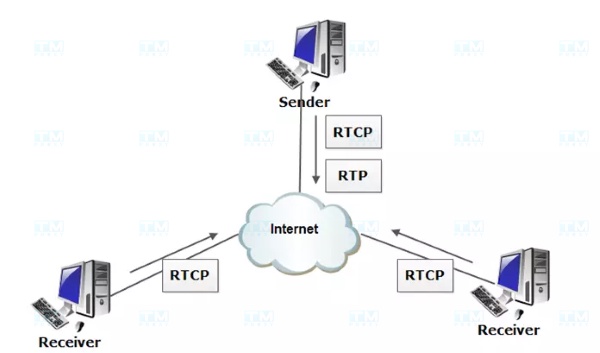
RTCP (RTP Control Protocol) works alongside RTP to provide feedback to users about the quality of the media stream. RTCP is a protocol commonly used on client devices to report on service quality metrics such as latency, packet loss, or round-trip time (RTT). Based on this feedback, the server can adjust the codec or stream quality. If RTP cannot identify the codec or handle the data stream, it can use protocols such as SIP, H.323, or XMPP.
What is the RTCP Protocol?
Real-time Transport Control Protocol (RTCP) is a protocol that operates alongside RTP to monitor data delivery over large multicast networks. RTCP provides Quality of Service (QoS) information about the data stream, including packet loss rate, latency, and jitter.
The information collected by RTCP can be used to adjust data stream parameters, such as bitrate or codec format. This protocol is widely used in many multimedia fields, including:
- Voice over IP (VoIP)
- Internet Protocol Television (IPTV)
- Media streaming
- Video conferencing
In summary, although RTCP does not directly transmit multimedia data, it plays a crucial role in ensuring that data is transmitted reliably and efficiently.

History of the RTP Protocol
The RTP (Real-time Transport Protocol) was developed by the Audio Video Transport Working Group and was first published in 1996.
In the early 1990s, video conferencing emerged as a new application that required multimedia data to be transmitted reliably and efficiently. However, existing data transmission protocols such as TCP and UDP could not meet these requirements.
TCP is a connection-oriented protocol that guarantees all sent data packets are received, but this can cause high latency, making it unsuitable for video conferencing applications. Conversely, UDP is a connectionless protocol that does not guarantee delivery of all data packets, leading to the risk of data loss, which is also unsuitable for applications requiring high reliability.
To overcome these problems, the Audio Video Transport Working Group developed the RTP protocol. RTP provides the necessary features for reliable and efficient real-time multimedia data transmission, including:
- Packet sequence numbering: RTP packets are sequentially numbered to help applications detect lost or out-of-order packets.
- Timestamps: Each RTP packet contains a timestamp that helps applications synchronize multimedia data.
- Quality of Service (QoS) reporting: RTP can collect information about the quality of service of the data stream, allowing adjustment of parameters such as bitrate or codec format.
The RTP protocol has been improved and developed over many years to meet the growing demands of multimedia applications. Key improvements include:
- Support for new multimedia data formats such as H.264 and MPEG-4.
- Ability to operate on large multicast networks.
- Optimization for low-latency applications such as online gaming.
In summary, RTP is an important protocol in the field of multimedia communications, providing essential features to ensure reliable and efficient real-time multimedia data transmission.
Advantages and Disadvantages of the RTP Protocol
Like any other technology, the RTP protocol has its own advantages and disadvantages. Understanding these factors will help users make informed decisions when choosing this protocol for their applications.

Advantages of RTP
Some notable advantages of the RTP protocol include:
- Optimized design for real-time transmission: RTP was developed to transmit multimedia data with low latency, improving user experience in applications such as video conferencing and streaming.
- Versatile transmission capabilities: In addition to video and audio, RTP can also be used to transmit other types of data such as display status updates, telemetry data, and control information.
- Ensuring transmission accuracy: RTP employs multiple techniques to ensure transmission accuracy, such as calculating packet loss rates to detect lost packets. The protocol also uses packet sequence numbering and jitter compensation mechanisms to properly deliver out-of-order packets. These techniques ensure that multimedia data reaches its destination accurately, even when issues occur during transmission.
Disadvantages of RTP
RTP is an important protocol in multimedia communications, but it also has some limitations, including:
- No Quality of Service (QoS) guarantee: RTP does not provide functions to guarantee quality of service metrics such as latency, reliability, and bandwidth.
- No resource management: The RTP protocol does not reserve network resources or handle lost or out-of-order data packets.
- Primarily operates over UDP: RTP is mainly implemented over UDP, which limits the protocol's compatibility with other systems.
Technical Details of the RTP Protocol
Typically, RTP uses UDP packets, which makes data transmission faster and simpler, although it does not guarantee delivery efficiency. Therefore, RTP is often considered for use with TCP; however, issues arise because RTP's time-sensitive nature is incompatible with TCP's reliability and overhead.
All ports can be used for RTP, within the high port range from 1024 to 65535. RTP uses an even-numbered port, while RTCP uses the next odd-numbered port. For example, the Internet Assigned Numbers Authority has registered port 5004 for RTP and port 5005 for RTCP. Many other applications also use these ports as a standard.
RTP packets contain information such as packet sequence numbering, payload type specification, internal synchronization, and timestamps to identify latency issues within a single stream and find ways to resolve them.
Security vulnerabilities in RTP servers can arise from improper implementation, as they cannot encrypt or authenticate data. If left unaddressed, these vulnerabilities can lead to third-party intrusion, spoofing, or attacks on media streams. Therefore, VoIP systems using RTP need to be properly configured and secured to ensure the safety of media streams.
Additionally, RTP can be subject to DDoS attacks through distribution, corrupting a media stream or the clients connected to it. Furthermore, some services using RTP have had software vulnerabilities that made them susceptible to attacks.
What is a Rotating Proxy? Benefits of Using Rotating Proxies

RTP Protocol Header Formats
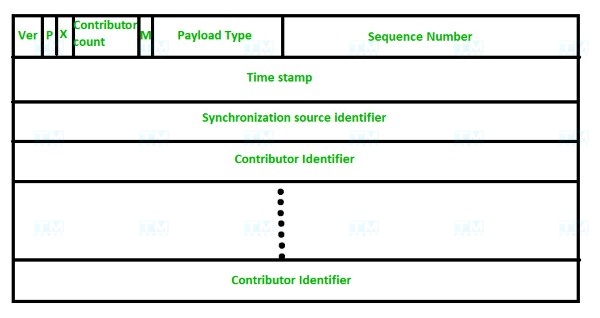
The RTP header format is simple and encompasses all real-time applications. Below is an explanation of each field in the header format:
- Version: This field is 2 bits long and identifies the version of RTP. The current version is 2.
- P (1 bit): If the value is 1, it indicates padding at the end of the data packet. If the value is 0, there is no padding.
- X (1 bit): If the value is 1, there is an additional extension header between the basic header and the data. If the value is 0, there is no extension header.
- Contributor Count (4 bits): Indicates the number of contributors, with a maximum of 15, since this field can only contain numbers from 0 to 15.
- M (1 bit): Used as an end marker, indicating that the data has ended.
- Payload Types (7 bits): Indicates the type of payload. Some common payload types include:
- The payload type is represented by a unique number, encoded in 7 bits in the RTP header format. Each payload type corresponds to a specific audio or video encoding method. An RTP source is only allowed to send one payload type at a time. This field primarily identifies the type of codec used in the media stream.
For example, if '1' is used to indicate the payload type with encoding name 1016, it will use the FS-1016 voice encoding type for media streams. If the payload type is '31' with encoding name H.261, it will use the ITU-T video compression standard. Each payload type number indicates a specific encoding type for audio or video streams.
- Sequence Number: This 16-bit field provides serial numbers for RTP packets, helping to determine ordering. The first packet's sequence number is randomly assigned, and subsequent packets increment by 1. This field is primarily used to check for packet loss or out-of-order delivery.
- Timestamp: The 32-bit Timestamp field is used to find the timing relationship between different RTP packets. The timestamp for the first packet is randomly chosen, and subsequent packets are calculated as the sum of the previous timestamp and the time required to generate the first byte of the current packet. The value of each timestamp increment may differ depending on the application.
- Synchronization Source Identifier: This 32-bit field is used to identify and define the RTP source. The value is a random number chosen by the source, helping to resolve conflicts that may occur when two sources have the same sequence number.
- Contributor Identifier: Finally, this 32-bit field is used to identify sources when there are more than one source in a session. The mixer source uses one Synchronization Source Identifier, and the remaining sources (up to 15) use Contributor Identifiers for differentiation.
Current Applications of the RTP Protocol
The RTP protocol is used to transmit real-time media streams, including audio and video. Some common use cases for RTP include:
- VoIP: RTP is used to transmit audio in VoIP calls.
- Video conferencing: Used to transmit audio and video in video conference meetings.
- Live broadcasting: Supports live video broadcasting, such as sporting events or news.
- Video-on-demand streaming: Previously, RTP was used for video-on-demand streaming, but nowadays, these services typically use DASH instead.

Code Examples Using the RTP Protocol
Consider a simple customer service phone system where a customer service agent needs a short time to look up information to answer a customer's question.
However, we cannot let the customer feel that the agent has paused the conversation. Therefore, a hold feature needs to be designed. This feature allows the agent to mute the audio from the customer's side and play music for them, enabling the agent to focus while the customer still feels the conversation is continuing.
In this example, we will use JavaScript combined with asynchronous functions and local peer for implementation.
Enabling Hold Mode
To enable hold mode, you can use the following code:
async function enableHold(audioStream) {

    try {

    await audioTransceiver.sender.replaceTrack(audioStream.getAudioTracks()[0]);

    audioTransceiver.receiver.track.enabled = false;

    audioTransceiver.direction = "sendonly";

    } catch(err) {

    /* handle the error */

    }

}
In the try block, we perform three steps:
- Replace the outgoing audio with a MediaStreamTrack containing music.
- Disable the incoming audio from the customer.
- Switch the audio transceiver to send-only mode. With these steps, the audio from the customer will be muted and music will be played for them to hear.
Disabling Hold Mode
To restore normal functionality, we add a disableHold() function as follows:
async function disableHold(micStream) {

    await audioTransceiver.sender.replaceTrack(micStream.getAudioTracks()[0]);

    audioTransceiver.receiver.track.enabled = true;

    audioTransceiver.direction = "sendrecv";

}
To restore the customer's audio and resume streaming, we perform the following steps:
Replace the currently playing music track with the original audio stream. Re-enable the audio from the customer's side. Switch the transceiver back to send-and-receive mode.
These steps reverse the enableHold() process that we performed earlier.
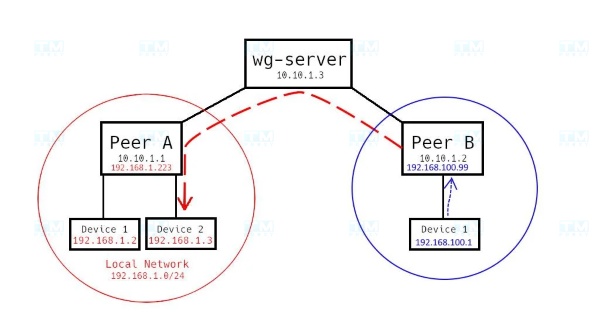
The example above simulates an application sending RTP packets. This code uses a socket library to establish a connection and send RTP packets with headers generated from basic information such as sequence numbers and timestamps. This is just a simple example, but it demonstrates how easy it is to start working with the RTP protocol.
Frequently Asked Questions About the RTP Protocol
Where Can I Learn About RFC 1889 and RFC 3550?
You can learn about RFC 1889 and RFC 3550 from the following sources:
- IETF Website: The IETF (Internet Engineering Task Force) is the organization that develops Internet protocols, including RTP and RTCP. The IETF website provides RFC documents, including RFC 1889 and RFC 3550.
- IANA Website: IANA (Internet Assigned Numbers Authority) manages Internet parameters, including the RTP packet format. The IANA website contains detailed information about the RTP packet format and related RFCs.
- Standards Organization Websites: Standards organizations such as ISO (International Organization for Standardization) and IEC (International Electrotechnical Commission) also provide information about the RTP and RTCP protocols.
- Service Provider Websites: Services such as Skype and Zoom often share information about how they implement RTP and RTCP in their products.
Additionally, you can learn about RTP and RTCP through technical documentation, specialized books, and research papers.
What is QoS?
QoS (Quality of Service) is an important concept in computer networking, especially in multimedia data transmission. QoS refers to the ability to adjust and manage bandwidth to ensure that real-time applications such as video conferencing or video streaming always operate smoothly and with high quality.
How is QoS Latency Measured?
QoS (Quality of Service) is a complex concept that encompasses many different factors. To accurately evaluate QoS, these factors need to be measured.
- Packet Loss: This is the number of data packets that are not successfully transmitted over the network. Packet loss can lead to interruptions or errors in applications requiring real-time data, such as video conferencing and online gaming.
- Latency: Latency is the time required for a data packet to travel from point A to point B on the network. High latency can cause disruptions in data transmission.
- Jitter: This is the unexpected variation in latency or bandwidth. This factor can cause disruptions or errors in data transmission.
- Bandwidth: Bandwidth is the maximum data transfer rate on the network. Low bandwidth can lead to congestion and affect service quality.
- Error Rate: The error rate measures the number of data packets that are corrupted during network transmission. A high error rate can cause disruptions or errors in data transmission.
Where Can I Learn More About QoS?
There are many online resources and books about QoS and methods for measuring it. Online courses from learning platforms such as Coursera and Udemy also provide useful knowledge about QoS and its applications in computer networking.
- Technical Reference Materials: There are many technical documents about QoS, including books, articles, and specialized publications such as "Quality of Service: Theory and Practice" by J. Kurose and K. Ross, and "The Art of Network Engineering" by D. E. Comer.
- Standards Organization Websites: Standards organizations such as ISO and IEC provide detailed information about QoS.
- Service Provider Websites: Companies such as Cisco and Juniper Networks also have extensive information related to QoS.
- Online Courses: There are many online courses about QoS, both free and paid. Some notable courses include "QoS on Juniper Networks" provided by Juniper Networks and "QoS for the Enterprise" by Pluralsight.
{{< test-result title="Comparison of Media Transport Protocols" headers="Criteria|RTP|RTSP|HLS|DASH" row1="Type|Transport protocol|Control protocol|Streaming protocol|Streaming protocol" row2="Transport over|UDP|TCP|HTTP|HTTP" row3="Latency|Very low|Low|High (10-30s)|High (10-30s)" row4="Interactivity|Yes (bidirectional)|Yes (play/pause)|No|No" row5="Applications|VoIP, Video call|IP camera, IPTV|Live/VOD streaming|Live/VOD streaming" row6="Security|SRTP|RTSPS|HTTPS|HTTPS" />}}
Conclusion: RTP is an indispensable protocol for real-time multimedia data transmission. Combined with RTCP for quality monitoring, RTP ensures synchronization and low latency for VoIP, video conferencing, and live streaming. Understanding RTP's header structure and operating mechanisms helps optimize communication applications.