





CMS (Content Management System) is a content management platform that helps create, edit, and publish websites without programming knowledge. This article provides a detailed analysis of CMS features, classifications, and a comparison of the top 12 most popular CMS platforms available today.
High-Speed Proxy - Ready to Try?
ALGO Proxy offers residential, datacenter & 4G proxies in 195+ countries
That is why Content Management Systems (CMS) were created, becoming a comprehensive solution that makes building and operating websites easier than ever before. This article will provide you with fundamental knowledge about what a CMS is, its development history, classifications, and a list of the most popular CMS platforms today.
What is a CMS?
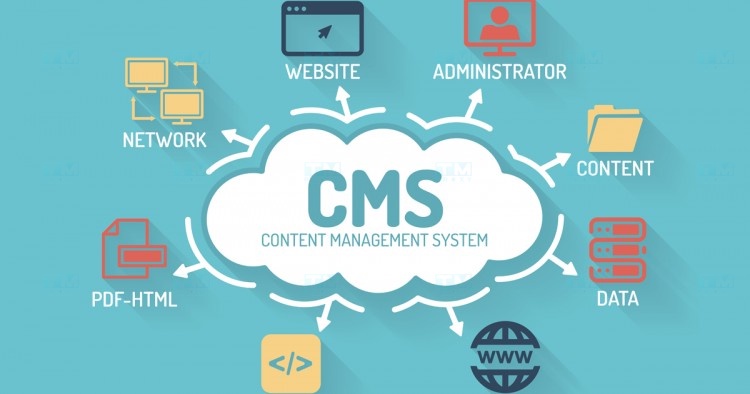
CMS stands for Content Management System. Simply put, a CMS is software designed to help users manage the entire process of creating, editing, organizing, and publishing digital content in the most convenient way. With a CMS, even those without much programming knowledge can easily build and operate a professional website while focusing resources on core tasks such as content creation, product development, or customer service.
History and Development of CMS
The concept of CMS appeared in the 1990s, closely tied to the explosion of the internet. However, it was not until the early 2000s that CMS truly became a trend with the emergence of numerous well-known open-source systems such as WordPress, Drupal, and Joomla.
In particular, the launch of WordPress in 2003 marked a major milestone, opening a new era for the website industry. From being just a platform for personal blogs, WordPress gradually developed and established its position as the world's number one CMS with over 60% market share. Meanwhile, other CMS platforms such as Drupal, Joomla, Magento, and others continued to improve and expand, creating a diverse and rich ecosystem.
Key Features of CMS
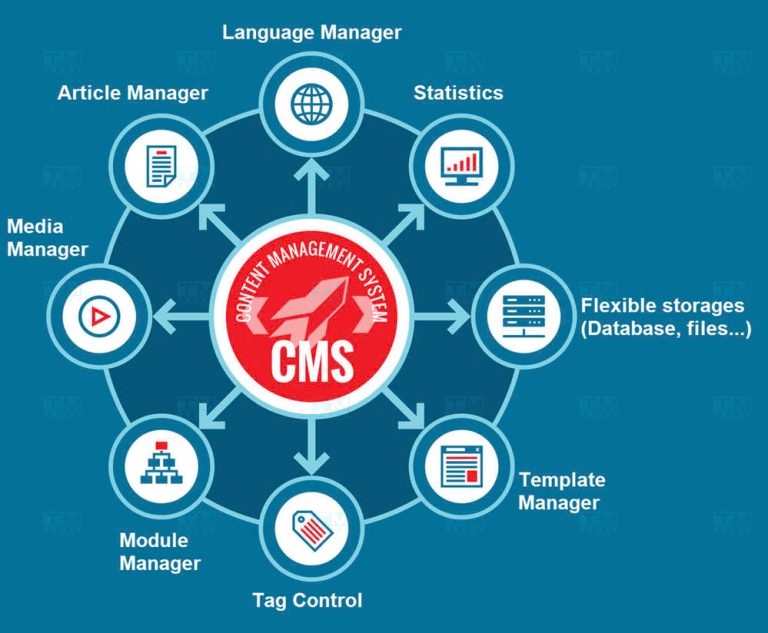
CMS platforms are equipped with many features to support efficient website management and operation:
Content Management
The core function of a CMS is supporting centralized and systematic website content management. By integrating the WYSIWYG (What You See Is What You Get) visual editor, CMS allows users to easily edit and format text, images, video, and other content types without in-depth knowledge of HTML or CSS. Additionally, CMS supports categorizing and searching content by multiple criteria, making management simpler and more efficient.
Design Management
Beyond content management, CMS also provides tools for designing and customizing website appearance. Users can easily install and change themes, page layouts, colors, fonts, and more without deep intervention in the code. Many CMS platforms also have extensive theme libraries with thousands of ready-made templates to meet the diverse needs of different industries and fields.
User Management and Permissions
For large-scale websites with multiple administrative levels, dividing roles and permissions for each user group is extremely necessary. CMS allows centralized user account management, setting permissions such as read/write/edit/delete for each user for specific categories, pages, or articles. This makes it easy to control system security and avoid errors during operation.
SEO Support
By integrating built-in features such as customizable URLs, Headings, Meta tags, and Sitemaps, modern CMS platforms like WordPress provide users with effective SEO tools right within their interface. SEO plugins for CMS are also continuously developed, offering advanced functions such as keyword analysis, speed optimization, and internal link building to help websites increase visibility and rankings on search engines.
Extending Features with Plugins/Extensions
Each website typically has unique feature requirements, and it is unrealistic for a CMS to address everything in a single package. That is why, similar to how smartphones allow app installation, most CMS platforms support extension mechanisms through Plugin/Extension/Module systems.
What is GUI? Advantages, Disadvantages, and Components of Graphical User Interface
From basic features like search, comments, and forms to specialized functions like e-commerce, multilingual support, and online learning, everything can be easily integrated into a website thanks to the diverse and rich plugin library, making website development faster and more flexible.
Reasons to Use a CMS
Using a CMS brings many benefits for individuals and businesses in building and developing websites:
Cost and Time Savings
Building a website from scratch is often very expensive and time-consuming, especially for small and medium-sized businesses. However, with a CMS, you can easily create a website in just minutes without hiring professional programmers. Pre-designed templates along with thousands of plugins and extensions also help minimize development costs while maximizing time and effort savings compared to traditional methods.
No Programming Skills Required
One of the greatest advantages of a CMS is its ability to help users take control of website management without needing in-depth programming knowledge. With just a few simple actions on an intuitive, user-friendly interface, anyone can customize the design, create articles, assign user permissions, or install new features. This helps businesses become more proactive and flexible in every step of their website development.
Enhanced Security and Scalability
Thanks to contributions from the global developer community, open-source CMS platforms are constantly updated and upgraded, not only in features but also in safety and security. Additionally, modular architecture allows websites to easily scale in both size and functionality, meeting future development needs without having to reinvest from scratch.
Types of CMS
There are several ways to classify CMS based on system characteristics and operating models:
Open-Source CMS
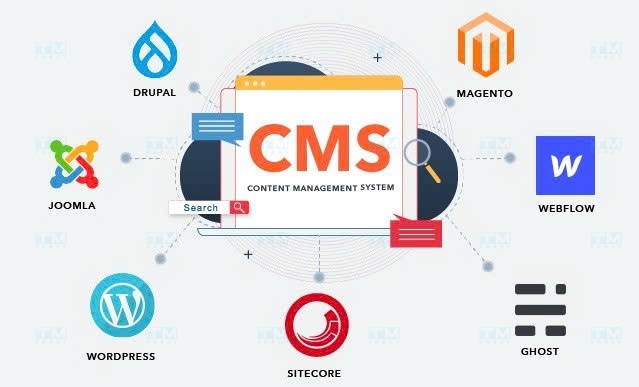
Open-source CMS are systems developed and shared freely under open licenses such as GPL, MIT, Apache, and others. Users have full rights to use, copy, modify, and redistribute without any cost. Notable CMS in this category include WordPress, Joomla, Drupal, Magento, PrestaShop, and more.
Commercial CMS
These are paid CMS platforms, typically developed exclusively by companies and organizations for commercial purposes. Compared to open-source CMS, this category usually provides more advanced features and services such as 24/7 technical support, optimized security, custom configurations, in-depth training and consulting, and more. Some notable names include Shopify, Squarespace, Adobe Experience Manager, and Microsoft SharePoint.

Top 12 Most Popular CMS Platforms Today
There are currently many CMS platforms with diverse features and application areas. Below are the 12 most popular names:
WordPress
You cannot discuss CMS without mentioning the leader — WordPress. Founded in 2003, WordPress now holds 65% of the global market share, and this number continues to grow. WordPress's strength lies in its simplicity, ease of use, and an incredibly rich and diverse Theme/Plugin ecosystem.
Moreover, WordPress's support for multiple languages and its backing by a large global community are key factors that make it the top choice for everyone from individuals to businesses.
WooCommerce
WooCommerce is actually a WordPress plugin, but with its unlimited extensibility and customization capabilities, it has quickly become the number one solution for e-commerce platforms.
Combining the power of WordPress with exclusive features such as order management, payment processing, and shipping, WooCommerce provides a comprehensive solution that allows anyone to easily build a professional online store in just a few steps.
Joomla
Developed since 2005, Joomla quickly became a direct competitor to WordPress thanks to its flexibility and high customizability. With its powerful MVC (Model-View-Controller) architecture and rich extension library, Joomla is suitable for building websites with complex features such as real estate, food, entertainment, education, and more.
Drupal
Drupal is another popular open-source CMS that is highly favored in the developer community. Known for its ability to handle complex tasks and top-tier security features, Drupal is trusted by many governments and large organizations worldwide such as the White House, NASA, Tesla, Harvard, and more. However, it is also a platform that is quite difficult for beginners due to higher technical knowledge requirements.
Magento
When discussing CMS platforms dedicated to e-commerce, Magento cannot be overlooked. With a comprehensive and specialized feature set including catalog management, orders, customers, promotions, SEO, and nearly unlimited scalability, Magento is always the top choice for major global brands such as Nike, Ford, Samsung, Nestle, and more. However, relatively high development and operating costs along with the need for a professional technical team are barriers that have prevented Magento from being widely adopted by small and medium businesses.
What is VPS Linux? Basic Introduction to Linux Virtual Servers
Shopify
Unlike traditional CMS platforms, Shopify is a SaaS (Software as a Service) e-commerce platform that allows users to build online stores without worrying about hosting, security, or system maintenance.
With just a few drag-and-drop actions on an intuitive interface along with a rich library of themes and apps, you can easily own a professional store without any programming knowledge. However, besides monthly costs, having website data entirely dependent on Shopify also carries potential risks.
PrestaShop
Like Magento, PrestaShop is an open-source CMS specialized for e-commerce. PrestaShop's outstanding advantages include being free, easy to install, providing all essential features for an online store, and having a large and active user community. As a result, PrestaShop is gradually establishing itself as a comprehensive and convenient e-commerce solution for small and medium businesses worldwide.
Squarespace
Although Squarespace launched later, it quickly made a name for itself in the global CMS market. Squarespace's strengths come from its extremely elegant and premium theme library, intuitive editing tools, and 24/7 customer support service.
Simply choose a design template and drag-and-drop content, and you can own a unique website without spending too much time. That is why Squarespace is favored by many artists, designers, photo studios, and other creative brands.
Wix
Similar to Squarespace, Wix is also an online drag-and-drop website builder with hundreds of beautiful templates for every industry. In fact, with the ADI design assistant, Wix can even automatically create a complete website after just a few simple questions.
Meanwhile, the Wix App Market also offers thousands of free and paid extensions, helping users easily add new features to their websites. Thanks to its simplicity and convenience, Wix has become the top choice for millions of individuals and small businesses around the world.
Ghost CMS
While WordPress is nicknamed the CMS for everyone, Ghost is a CMS dedicated to blogging. With the slogan "Just a blogging platform," Ghost focuses on maximizing the writing experience with a simple, elegant interface and a modern Markdown editor. Ghost also integrates built-in features such as SEO, speed optimization, security, and design customization, making building and running a blog easier and more professional than ever.
Beyond the CMS platforms listed above, the web world has countless other systems catering to specific needs such as OctoberCMS (for developers), Grav (for static websites), Typo3 (for large enterprises), and more. However, with outstanding features and high popularity, the 12 names on this list promise to be ideal choices for any individual or organization looking to master their digital space in the 4.0 era.
Benefits of Using a CMS
Beyond the general advantages, each CMS brings many specific benefits to users:
Cost Savings on Investment
With thousands of themes and plugins developed by the community, most open-source CMS platforms like WordPress allow creating a complete website without any cost. Even when specialized features are needed, the cost of purchasing and customizing a theme/plugin is much lower than hiring custom development. Additionally, adopting a CMS also significantly saves development time, thereby reducing labor and opportunity costs.
Easy to Use and Administer
The existence of CMS is precisely to simplify website building and operation. With just a few basic actions such as editing, copy-paste, or drag-and-drop, anyone can easily create an attractive web page without knowing how to code. An intuitive, friendly admin interface and optimized workflow also save time and effort compared to traditional methods.
Enhanced Interaction and User Experience
By integrating built-in interaction tools such as comments, reviews, and social media sharing, most modern CMS platforms support users in easily connecting and engaging with customers. Smart search, filtering, and navigation features also help users easily discover content they are interested in, thereby improving experience and increasing conversion rates.
Flexibility in Scaling and Customization
One of the key advantages of CMS is its flexibility and unlimited scalability. Thanks to modular architecture, CMS-based websites can easily add or remove features without affecting other components. These systems also provide many customization options for interface and configuration, from simple to advanced, meeting most customization needs according to each business's brand and business strategy.
Factors for Choosing the Right CMS
To choose the right CMS, you need to consider several important factors:
Define Your Usage Goals
Every website is created with specific goals, whether it is selling products, promoting a brand, sharing information, or interacting with customers. Depending on those goals, businesses should choose a CMS with appropriate features.
Ease of Use and Management
If the website operations team does not have much technical experience, ease of use is the top priority when choosing a CMS. Systems with intuitive interfaces, simple workflows, and detailed documentation will help optimize user experience and minimize training costs.
Scalability and Integration
Websites always need to evolve to adapt to the market and customer needs. Therefore, a good CMS must be flexible enough to expand features and easily integrate with other systems such as CRM, ERP, social media, Digital marketing tools, and more, creating a synchronized and comprehensive technology ecosystem.
User Community
For open-source CMS, community support plays a very important role. A strong community with many participating experts helps users easily find resources, get answers, and keep up with the latest technology trends. At the same time, this also ensures the CMS is continuously developed and does not become outdated.
Security and Stability
Information security is a critical factor for every website, especially systems involving personal data and online payments. Therefore, the chosen CMS should have a good security track record, be regularly updated, and provide comprehensive protection measures such as two-factor authentication, SSL encryption, backup solutions, and more.

Important Considerations When Using a CMS
To maximize the power of CMS and minimize risks, users should pay attention to the following issues:
Choose Themes and Plugins from Trusted Sources
The themes/plugins ecosystem is one of the biggest attractions of open-source CMS platforms. However, installing a low-quality extension can cause website errors, slow speeds, or even security breaches. Therefore, users should prioritize products with good reviews, developed by reputable individuals and organizations with long-term technical support.
Back Up Data Regularly
Incidents and data loss are constant risks for any website. Therefore, regular backups are mandatory to avoid unfortunate losses. With CMS, users should proactively back up the database and source code at least weekly, while combining cloud storage solutions for increased safety.
Update Security and New Features
CMS platforms continuously develop with many upgrade versions and patches. Updating to the latest version not only protects the website from attack threats but also brings many useful features and improvements. However, before upgrading, ensure compatibility with current themes/plugins and always back up to avoid unfortunate incidents.
Optimize Speed and Performance
Page load speed is one of the most important factors affecting user experience and search engine rankings. To optimize website speed and performance on CMS, users should note several techniques such as image compression, enabling cache, reducing redirects, using CDN, choosing high-quality hosting, and more. Additionally, avoiding plugin overuse, disabling unused features, and minimizing code are also effective ways to speed up the website.
Comply with Copyright Regulations
Although most CMS provide open-source licenses, this does not mean users can freely copy and modify all content. Before using any images, text, audio, video, or other content, ensure they do not violate copyright and have valid commercial licenses, especially for business purposes. Doing so not only shows respect for the creators but also helps avoid unnecessary legal risks.
{{< test-result title="So sanh cac CMS pho bien" headers="Tieu chi|WordPress|Shopify|Drupal|Joomla|Wix" row1="Loai|Ma nguon mo|SaaS|Ma nguon mo|Ma nguon mo|SaaS" row2="Chi phi|Mien phi|Tu $29/thang|Mien phi|Mien phi|Tu $16/thang" row3="De su dung|Cao|Rat cao|Thap|Trung binh|Rat cao" row4="Thi phan|65%|~4%|~2%|~2%|~3%" row5="Phu hop|Blog, doanh nghiep|Ban hang online|To chuc lon|Website phuc tap|Ca nhan, SME" />}}
Conclusion: CMS is a comprehensive solution that helps individuals and businesses build professional websites without programming knowledge. Depending on specific needs, you can choose WordPress for blogs and businesses, WooCommerce/Shopify for e-commerce, or Drupal for large organizations requiring high security. The important thing is to define your usage goals, scalability needs, and budget before making a choice.